Why choose a construction specific ERP solution (2026)
Generic ERP breaks down on job sites. See exactly what construction-specific ERP fixes for bidding, compliance, cash flow, and delays. Compare options now.
Streamline your frontline operations
A construction specific ERP solution is worth choosing over a generic ERP because it's really built around how the work actually happens in the field. Instead of making everything fit a one size fits all model, it supports job costing by project, not just by department, it keeps subcontractor work and compliance tracking front and center, and it moves real time information between the site and the office. And honestly, that detail is the difference between seeing the job clearly or kind of guessing.
- Generic ERP often treats every job like it's a retail transaction, but construction isn't like that, projects shift, scope changes, and timelines get messy.
- Compliance failures like expired certifications, missing insurance, or subcontractors who don't meet qualifications are one of the top reasons for delays and also the legal exposure that nobody wants.
- Disconnected spreadsheets plus bolt on tools create those familiar blind spots, the ones that quietly turn into cost overruns.
- A true all in one construction ERP, like WorkforceMS, removes the need to stitch together five separate systems in the first place.
Introduction
Construction companies end up losing money in these pretty predictable ways, like the subcontractor insurance thing just lapses right in the middle, or a compliance paper somehow goes missing right before an audit. And then, sometimes the office only finds out about the budget overrun like three weeks after it already happened.
It's not really "bad luck" though, it's more like the business model is project-based, compliance-heavy, but the tools in the background were never made for that exact mix. A construction specific ERP solution helps, because it puts compliance, subcontractor oversight, and job costing into the actual center of the system, not as an afterthought that you sort of duct tape on later.
In this guide, we break down why that difference matters, what you should look for and also how to sidestep the kinds of mistakes that make ERP rollouts fail in the first place. And unlike most vendor comparisons, this one leans closer on the part most construction ERP content skips over, which is how compliance and subcontractor risk are actually handled and solved in practice not only name checked in a bullet list.
What is a construction specific ERP solution?
It's basically enterprise resource planning software that's made to fit how construction firms actually work, kind of like it pays attention to costs, rules, and resources, but it does it per project, not just as some broad general ledger buckets.
And unlike generic ERP, which was often originally built for manufacturing or retail, a construction ERP tends to cover job costing by project and phase, plus subcontractor and vendor management, compliance and certification tracking, and procurement that's tied back to the job.
It also gives real time visibility between the field and the office, so you're not guessing. In practice, it replaces that awkward mix of spreadsheets, accounting tools, and standalone compliance trackers that a lot of construction companies end up running at the same time, somehow.
The Hidden Cost of Generic ERP and spreadsheets in construction
Generic ERP stuff and spreadsheets kinda fail construction companies because they can't track cost against a live project that keeps changing. They were really built for steady departmental budgets, not for job sites with shifting scope, subcontractor churn, and those never-ending change orders.
So the data ends up in like five different places, budgets sit in a spreadsheet, compliance documents wander through email threads, subcontractor certifications get tucked away in a filing cabinet and the actual job costs land in accounting software that updates later.
Often weeks after the fact. And every little gap between those systems becomes a hideout where a cost overrun, a missing certification, or a compliance violation can sit quietly until it's suddenly very expensive.
Construction-Specific ERP vs. Generic ERP: Key Differences
| Capability | Generic ERP | Construction-Specific ERP |
|---|---|---|
| Cost tracking | By department/GL code | By project, phase, and cost code |
| Compliance tracking | Not built-in; needs add-ons | Native certifications, insurance, permits |
| Subcontractor management | Manual or third-party tool | Built-in contracts, payments, credentials |
| Field-to-office data | Delayed, batch-updated | Real-time |
| Change orders | Manual re-entry | Tracked against live budget automatically |
Generic ERP can be configured to approximate some of this, but it typically requires expensive customization or a stack of bolt-on tools which reintroduces the exact fragmentation a construction company was trying to eliminate.
How Construction ERP helps with compliance and subcontractor risk
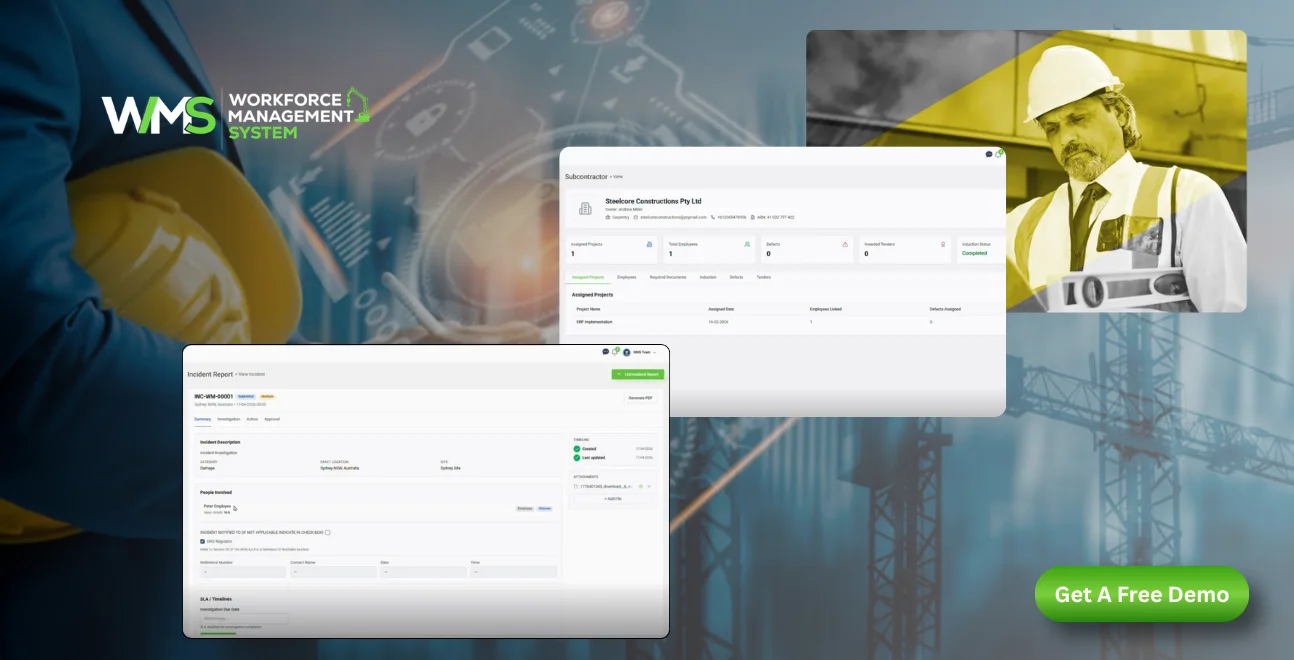
Compliance plus subcontractor risk, this is the part where generic systems kind of fall apart in the real world. Construction-specific ERP fits better because it is built for how jobs actually move. The platform keeps track of each subcontractor's insurance, licensing, and safety certifications, and yeah it does it against expiration dates automatically. Then it flags the gaps, before they turn into an on site problem or an audit headache.
Certification and insurance tracking
Construction ERP holds a current record of every subcontractor's insurance certificates, safety training, and licensing standing. Instead of spending time chasing renewal dates across a spreadsheet that everyone edits a little, the system sends automated reminders before documents lapse. It also prevents a subcontractor from being assigned to new work if their documents are not up to date. In other words, compliance stops being a last-minute scramble and becomes a continuous, auditable routine.
Contract and payment automation
Subcontractor agreements, retention clauses, and payment timetables are tied directly to the project budget, not stored somewhere separate in a random contracts folder. Automated workflows route approvals, and when compliance status changes they can flag payment terms that should not be processed. It also creates a clear digital audit trail, and this is important not just for smooth operations but for legal cover too, even when something goes sideways.
Why this matters more than it seems
One expired insurance certificate, or a safety certification that just got overlooked, isn't merely paperwork drift. It can leave coverage shaky during an incident, trigger a stop work order, or pop up later as a finding in a client audit, months after the work happened.
And since these documents tend to expire on different staggered timelines across many subcontractors, doing it manually stops scaling fast. Automated tracking is less about "nice to have" convenience and more about closing off risk exposure that quietly grows each time you add another subcontractor to a job.
How Construction ERP Improves Cost Control and Cash Flow
Construction ERP improves cost control by tying every cost labor, materials, subcontractor payments to a specific project and cost code in real time, rather than reconciling it after the fact through accounting software.
This gives leadership a live view of projected final cost and margin on every active job, not just a company-wide P&L that lags site activity by weeks. Cost overruns get caught while there's still time to act on them, and cash flow forecasting becomes based on real project data instead of estimates.
How Construction ERP Connects Site and Office in Real Time
Construction ERP eliminates the lag between what happens on-site and what the office knows by syncing field data, labor hours, material use, progress, safety incidents directly into the same system finance and leadership use.
Field teams log data through mobile access, and it updates budgets, schedules, and compliance records immediately, instead of waiting for a weekly report or manual data entry. This closes the gap that generic systems and disconnected spreadsheets leave wide open.
Core Features of a True Construction-Specific ERP
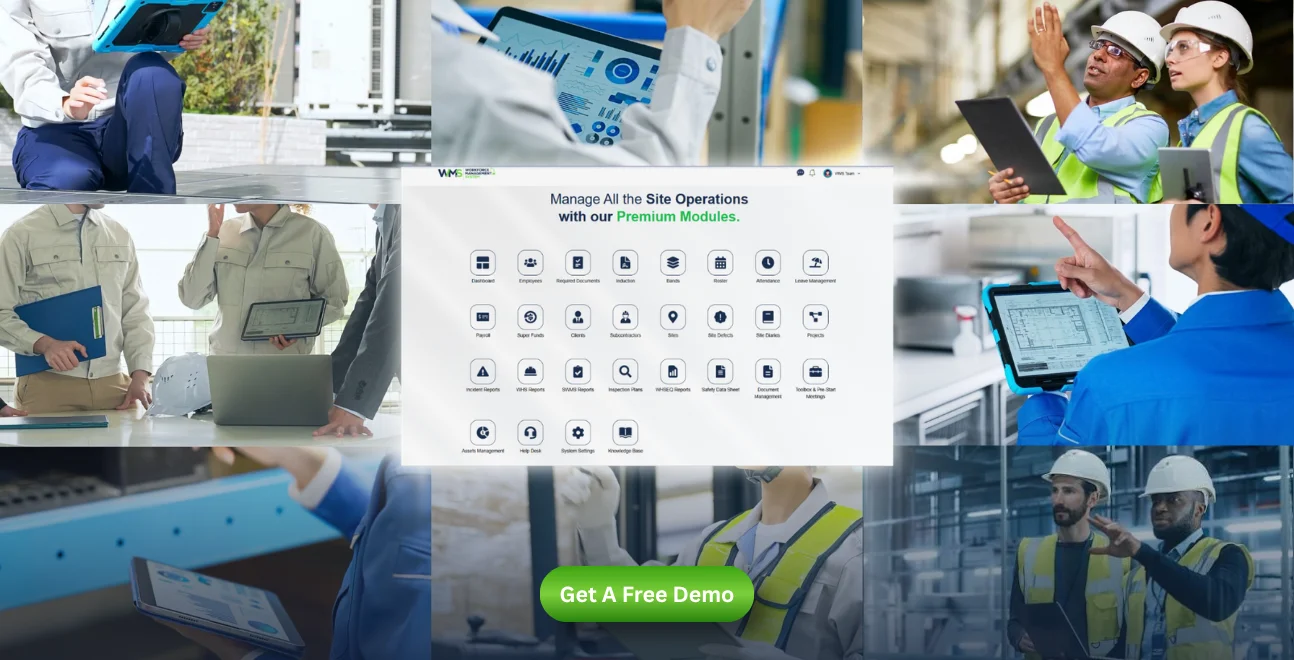
A construction-specific ERP should include, at minimum:
- Compliance and safety tools certification tracking, automated expiration alerts, audit-ready documentation
- Financials and job costing cost-code-level tracking, real-time budget vs. actual, cash flow forecasting
- Field-to-office sync mobile data capture, live project visibility, automated change-order tracking
Anything less typically means bolting on separate tools for compliance or subcontractor management which is the fragmentation a construction-specific system is meant to eliminate in the first place.
Common Mistakes Companies Make Choosing an ERP
The most common ERP-selection mistakes are choosing based on price before fit, skipping a proper requirements assessment, and assuming a generic ERP can be customized into a construction-specific one without significant hidden cost.
Other frequent mistakes: underestimating implementation time, failing to involve site teams (not just finance) in the selection process, and choosing a system that handles job costing well but treats compliance and subcontractor management as an afterthought which recreates the exact fragmentation the company was trying to solve.
What a Compliance Ready Construction Operation Looks Like
A compliance ready operation using construction-specific ERP maintains a continuously current record of every subcontractor's certifications, tracks insurance expiration automatically, and can produce a full compliance audit trail in minutes rather than days.
Cost data is current within the same day work is performed, not weeks later. Change orders update the live budget automatically instead of requiring manual re-entry. And because compliance, financials, and field data sit in one system, leadership can see risk exposure not just cost exposure at any point in a project's lifecycle.
How to Choose the Right Construction ERP for Your Business
- Define your requirements first job types, subcontractor volume, and compliance obligations, before talking to vendors. Walking into a sales conversation without this puts the vendor in control of the framing.
- Prioritize compliance and subcontractor management, not just job costing, since this is where generic systems and thin construction ERPs fail most often once contracts scale.
- Confirm real-time field-to-office sync, not batch or manual updates. Ask vendors directly how long it takes for a field entry to appear in the office dashboard.
- Check for true all-in-one coverage rather than a core system plus several bolt-on modules. Ask what's included natively versus what requires a third-party integration.
- Involve site and project teams, not just finance, in evaluation the people entering data daily will determine whether the system actually gets used correctly.
- Ask about implementation timeline and training support up front, and get it in writing rather than as a verbal estimate during the sales process.
Construction ERP Trends: AI, Automation, and Compliance Tech
Construction ERP in 2026 is increasingly built around automated compliance monitoring, AI-assisted cost forecasting, and predictive alerts that flag likely overruns or compliance gaps before they occur, rather than simply reporting on them after the fact.
The direction is toward systems that reduce manual compliance work, specifically automatically cross-checking subcontractor documentation against project requirements rather than just digitizing paperwork that still requires manual review.
Three trends stand out for 2026 buyers evaluating a construction-specific ERP:
- Predictive cost alerts flagging a project trending toward overrun weeks earlier than a traditional monthly report would surface it
- Automated compliance cross-checks matching subcontractor documentation against project- and jurisdiction-specific requirements without manual review
- Field-data-driven forecasting using real-time labor and material data from mobile field apps to continuously refine budget projections, rather than relying on static estimates set at project kickoff
None of these require replacing an existing ERP outright but they do require a system where compliance, cost, and field data already live together, since predictive and automated features can't work across data that's still fragmented across separate tools.
Why WorkforceMS Is Built as a True All-in-One Construction ERP
WorkforceMS is built around the two areas construction companies get burned on most: compliance and subcontractor management, combined with job costing, procurement, and field-to-office visibility in a single platform not a core ERP with compliance bolted on as an add-on module.
That matters because every additional bolted-on tool is another place where data can fall out of sync, another login for site teams to manage, and another gap where a compliance document can slip through unnoticed. WorkforceMS is designed so subcontractor credentials, project costs, and field data live in one system from day one.
Conclusion
Choosing a construction-specific ERP solution over a generic system comes down to one thing: whether compliance, subcontractor management, and project-based costs are built into the system's core, or bolted on afterward. The companies that get burned by cost overruns and compliance gaps are almost always the ones running fragmented tools that were never designed to talk to each other.
WorkforceMS was built specifically to close that gap in compliance, subcontractor management, job costing, and field visibility in one all-in-one platform, without requiring a stack of bolt-on tools. If subcontractor compliance and project cost control are the areas costing your company the most time and risk, see how WorkforceMS handles both in a single system.
Optimise your operations with WMS
Streamline scheduling, compliance, and workforce management in one platform.
FAQ: Construction-Specific ERP Solutions
A generic ERP isn't really made to track compliance, subcontractors, or the project based costs out of the box, so construction firms often end up gluing in extra tools. That ends up recreating a kind of fragmentation the ERP was supposed to remove, and honestly it gets messy fast.
It's ERP software designed around construction workflows like job costing per project. It also covers subcontractor and compliance management, plus real time field to office data, not just generic departmental accounting.
It can log insurance, licensing, and safety certifications automatically. Then it sends reminders before documents expire, and in some setups it can even stop non compliant subcontractors from being assigned new work.
Mostly, real time cost visibility, automated compliance oversight, fewer cost overruns, quicker audits, and one unified system linking the jobsite to the office.
In many cases yes, especially for compliance and subcontractor tracking. The admin effort of managing certifications manually tends to scale poorly, even when the company is smaller.
It depends on company size and how complicated data migration is. A phased rollout, starting with compliance and job costing, is pretty common because it reduces disruption.
Traditional ERP tends to track costs by department. Construction ERP tracks costs by project, phase, and cost code, and it treats compliance and subcontractor management as core functionality, not a side feature.
Usually yes. Most modern platforms, including WorkforceMS, are built to integrate with current accounting systems, or replace them during implementation, depending on what you have now.
Often, yes. When you can see budget vs actual cost in real time at the project level, problems surface while there's still time to adjust, rather than discovering everything after the fact.
General contractors, subcontractors, infrastructure firms, and heavy civil construction companies of different sizes.
Related Articles
Explore more insights on workforce management, compliance, and operations.

Top AI Solutions To Manage Construction Workforce
Explore the top AI solutions for managing a construction workforce, from onboarding to payroll and safety, with human review built in.
WorkforceMS Team
14 Sep 2026

Streamline Job Tracking with AI Construction Management Software
Discover how AI construction management software streamlines job tracking, project planning, risk alerts, defect reporting and safety compliance.
WorkforceMS Team
11 Sep 2026

Skills and Compliance Management for Construction Teams
Manage skills and compliance for construction teams with WorkforceMS. Track licences, SWMS, inductions and audits in one workforce management system.
WorkforceMS Team
10 Sep 2026
Ready to secure your operations?
