How a Project Task Management System Transforms the Way Construction Teams Work
Discover how WMS project task management software helps Australian construction teams track tasks, manage dependencies, and deliver projects on time.

Share this article

Streamline your frontline operations
See how WMS simplifies scheduling, compliance and workforce management in one powerful platform.
Introduction: The Hidden Cost of Poor Task Management on Construction Sites
Construction projects rank among the toughest challenges any industry throws at us. You've got dozens of trades juggling multiple sites, timelines that shift on a dime, strict regulations hanging over everything, and serious cash at stake there's no room for chaos.
Yet right here in Australia, whether you're talking backyard builders or the big commercial players, you'll still find heaps of them sticking to dog-eared spreadsheets, whiteboard chicken-scratch, or simply hollering orders across the dirt. And believe me, it's costing them a fortune in ways they can't ignore.
Imagine the mess: handovers that go completely off the rails, tradespeople jumping into tasks before their time and causing hold-ups, no one willing to put their name on the line for accountability, and the whole team tearing apart toolboxes and trailers hunting for that one vital document right as deadlines bear down hard.
These go beyond small frustrations they're glaring signals that the outdated methods simply can't cope with the relentless speed and demands of contemporary construction projects.
Adding more team huddles or getting swamped in endless email exchanges? That's not the answer; it just buries you deeper. The real fix lies in a rock-solid project task management system one that delivers a sharp, always-current snapshot to every single person, whether they're knee-deep in the site or back at the head office: exactly what comes next, precisely who's accountable for it, and the unvarnished truth on progress right then and there.
That's precisely where the Task Management Module within the Workforce Management System (WMS) from workforcems.com.au steps up to the plate.
Its purpose is engineered for this world, pulling together Kanban-style visual tracking, smart dependency handling, priority settings, document attachments, and real team collaboration all in one platform tailored for Australian construction and allied trades.
In this piece, we'll break it all down: what this module delivers, how it operates in the field, and why it should matter to project managers, site supers, and owners dead set on ramping up efficiency.
What Is Project Task Management Software for Construction Teams?
Strip it back, and project task management software is really just a robust digital setup for creating tasks, assigning them to the right people, keeping a close eye on how they're going, and finally closing them out once done.
In the thick of a construction job, we're talking practical stuff like giving the all-clear on a concrete pour after inspection and cutting the compliance certificate, or getting a subcontractor locked in for their slot, or hounding down approval on a variation order that could throw the whole schedule off.
The tried-and-true ways like clunky spreadsheets or those never-ending chains of emails just don't hold water in this environment. They lack live visibility, zero automation, and no real workflow muscle. Construction demands tools that grapple with the gritty reality tasks chained in rigid sequences, site conditions flipping fast, and a crowd of players all needing the same info at once.
The WMS Task Management Module tackles this head-on with a central, cloud-based hub. Every task gets an owner, status, priority, deadline, and its spot in the full project flow making the impossible feel routine.
Navigating the Task Management Module
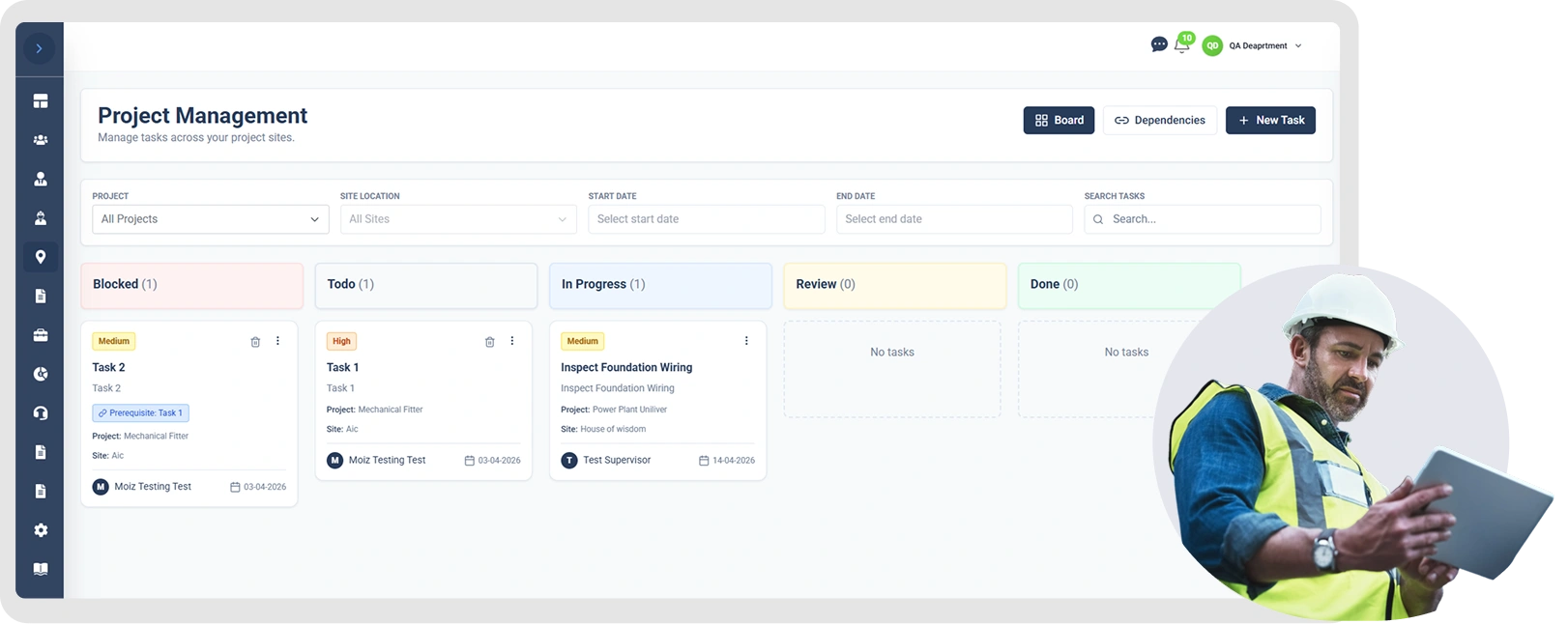
Jumping into the WMS task system couldn't be simpler. From the dashboard, head to Project Management → Task Management, and you're looking at three core views:
- The Board: Kanban-style layout showing all tasks by status
- Dependencies: Graph view mapping task connections
- New Task: Quick interface for logging fresh work
This no-fuss setup means you grab the big-picture progress, drill into sequences, or add a task in moments. On a heaving construction site where time slips away if you're not careful, that kind of straightforward access is pure gold no crew member wants to battle through some fiddly, over-complicated menu just to get to their work.
The Kanban Board: Real-Time Task Visibility for the Whole Team
The Kanban board forms the beating heart of the entire module. Not familiar with the setup? It's basically a straightforward visual breakdown of how work flows columns are laid out for each phase, and individual tasks are represented by cards you drag along as they move forward.
In WMS, it's tuned to construction's rhythm with five columns tracking a typical task life:
- Blocked: Stuck until a prior step clears
- To Do: Ready but not yet tackled
- In Progress: Underway by the assigned crew
- Review: Submitted, waiting for boss approval
- Done: Signed off and finished
Each column tallies its tasks, so you spot imbalances instantly like six blocked items versus one in progress, screaming bottleneck upstream.
This visual punch is prime workflow automation for construction tasks. It swaps vague check-ins for hard, live facts.
Creating and Configuring Tasks: Everything in One Place
Spinning up a new task is a guided walkthrough that catches every must-have detail. Hit "New Task", and a modal pops up with fields honed for construction realities.
Key fields cover:
- Task title: Straightforward name for the job
- Description: Full specs, notes, or background for the doer
- Project: Links it to the right job
- Site location: Pins it to the physical spot
- Assigned To and Select Assignee: Role and person on point
- Due date: Hard deadline
- Priority: From low to critical
- Status: Starting point
- Prerequisite task: Flags what must finish first (details ahead)
- Comment: Extra guidance right away
- Document upload: Files clipped straight on
This depth sets pro construction tools apart from basic apps. Tasks aren't tick boxes; they're full dossiers tying people, sites, timelines, and docs into one trackable package.
Task Priority Levels: Keeping the Critical Work Front and Centre
Not every job weighs the same a safety check trumps folder updates every time. WMS nails this with four clear priorities:
- Low: Can slide without fallout
- Medium: Everyday backbone work
- High: Needs quick handling
- Critical: Drop-everything urgent, often make-or-break
It bubbles key items up, letting teams sort personal views by priority so nothing vital gets lost. Managers scan for reds and jump in early. For outfits juggling sites and projects, this isn't optional it's how you stay safe and sharp.
Task Dependency Management: Building the Right Sequence
Construction's all about order: no stripping formwork till concrete sets, no insulation till electrics are roughed in, and no next phase without safety sign-off. Mess that up, and you're paying for rework or fines.
WMS builds in "Prerequisite Task" smarts. Link one, and it stays blocked till the prerequisite hits 'Done' then it auto-shifts to 'To Do'. No nagging supervisors; the system nudges automatically, slashing premature starts or oversights in trade handovers.
The dependencies graph amps it up: pick vertical chains or horizontal timelines. Nodes show title, status, priority, ID pinpointing snags fast.
Document Management Within Tasks: No More Lost Paperwork
Sites drown in paper plans, photos, reports, certs, specs, and safety docs. They're everywhere: inboxes, drives, sticks, cabinets. Grabbing the right one mid-chaos? Nightmare.
WMS fixes it by letting you staple docs right to tasks. Upload on create or edit, and the assignee has it all at their fingertips no emails, no hunts.
It handles instructions, images, reports, specs, and compliance keeping info laser-focused on the task, not buried in folders.
Viewing Task Details: Full Context on Demand
Hit any card on the board, and up comes the detail panel laying out the complete picture: the task title, full description, who's assigned, the project and site it's linked to, due date, priority rating, attached documents, and current status, along with all comments and notes. Supervisors get the lowdown without bugging the worker perfect for checks or calls.
Searching and Filtering the Board: Managing Large Projects with Ease
Big jobs mean task overload. WMS's filters slice through the following:
- By project
- By site
- Start date
- End date
- Keyword search
Ideal for briefings, reviews, or client asks zero in on what counts.
Collaboration Through Comments: Keeping the Team Informed
Tasks thrive on talk between PMs, supers, trades, and subs. WMS's comments let anyone drop updates, instructions, flags, or notes right on the task. It builds a clean history, ditching email sprawl for shared clarity.
Real Use Cases: How Construction Businesses Apply the WMS Task Module
Trade package tracking
A commercial builder tags milestones per trade pours, steel, mechanical, and finishes to supers, prioritised and site-linked. The board shows all trades live.
Compliance sequencing
Civil crew locks excavation behind safety checks auto-blocked till cleared.
Maintenance across sites
The facilities firm assigns techs recurring jobs with instructions and pics pre-loaded.
Audit-ready docs
Builder clips certs to tasks; auditors get instant proof.
Why WMS Outperforms Generic Task Management Tools for Construction
Sure, Trello or Asana have boards, but they're not built for Aussie construction. WMS integrates with project, site, geofencing, and workforce tools tasks auto-contextualise without manual glue. For multi-site, contractor-heavy, compliance-tight ops, that's the edge.
Conclusion: Build a Better Way to Work
Construction's going digital, and the smart players snag contracts, hold onto talent, and hit deadlines. Task management is the pulse.
WMS delivers Kanban visuals, auto-dependencies, priorities, docs, comments, and filters turning mess into machine.
Ditch spreadsheets and shouts the inefficiency adds up. Check workforcems.com.au to see how WMS sharpens your edge.
Optimise your operations with WMS
Streamline scheduling, compliance, and workforce management in one platform.
Frequently Asked Questions
Split project into tasks. Assign to team. Track till done on time.
One system to organise, assign, and track tasks. Construction needs it for better coordination. Cuts delays. Real-time view. Beats spreadsheets and emails.
Link tasks in sequence. The next one waits till the prior finishes. Set prerequisite. It holds till done. Then auto-releases. Keeps order; no early starts.
WMS offers four levels: low, medium, high, and critical. Urgent jobs like safety checks or trade handovers stand out. Sort and filter tasks by priority. Critical ones rise to the top. No getting lost, even with heaps of work across sites.
WMS is tailored for construction outfits juggling multiple sites and projects. It pulls task tracking, clear accountabilities, dependency controls, document handling, and crew comms into a single, no-fuss system. For builders, foremen, and PMs, that's fewer cock-ups and proper grip on the job.
Related Articles
Explore more insights on workforce management, compliance, and operations.

Security Operations and Monitoring Workforce Planning
Plan guard rosters, track live attendance and cover every shift with WorkforceMS. Strengthen security operations and monitoring with smarter workforce planning.

Muhammad Asim
09 Oct 2026

Telehealth and Digital Healthcare Scheduling WMS
Simplify telehealth and digital healthcare scheduling with WorkforceMS. Manage rosters, remote clock-ins and compliance records in one easy-to-use platform.
Muhammad Asim
08 Oct 2026

Healthcare Workforce Management for Aged Care
Simplify rostering, credential tracking and payroll for aged care healthcare teams. Discover how WorkforceMS gives your carers more time with residents.
Muhammad Asim
05 Oct 2026
Ready to secure your operations?
