
WMS
Top AI Solutions To Manage Construction Workforce
14 Sep 2026•1 min read
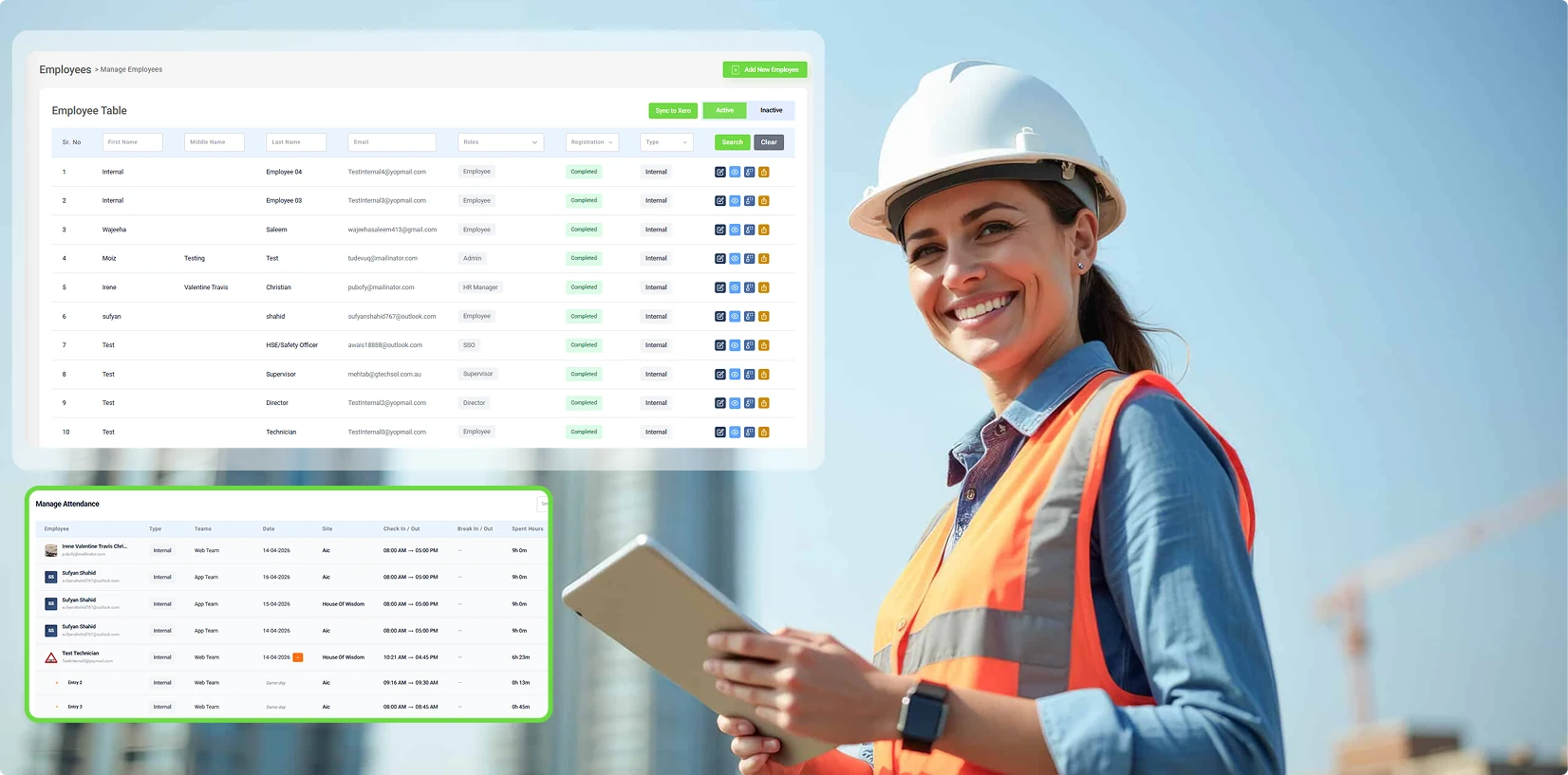
HRM & Workforce Management for Australian Construction — 2026
Running HR in the Australian construction world is like trying to herd cats on a moving scaffold. You've got subcontractors bouncing between sites, site crews with rosters that shift like the weather, full-time staff juggling multiple projects, and a relentless stack of compliance rules under Fair Work and WMS. For too many outfits, it all boils down to a messy mix of Excel sheets, scribbled forms, endless email threads, and half-baked apps that leave HR folks buried and wide open to expensive slip-ups.
That's where a tailored Human Resource Management (HRM) system like WMS steps in and changes the game. It doesn't shove HR into some dusty back office; instead, it makes it the beating heart of operations, weaving together employees, paperwork, scheduling, time tracking, payroll, and compliance into one seamless platform.
In this piece, we'll dive into every key module in the WMS setup, breaking down what it handles, why it counts, and how it equips Aussie construction firms to operate sharper, stay on the right side of the law, and genuinely support their teams.
Human Resource Management, or HRM, is all about the smart, ongoing work of bringing people on board, building their skills, overseeing their day-to-day, and keeping them motivated to stick around. Day-to-day, that covers everything from initial paperwork and time logs to running payroll, greenlighting time off, and making sure safety trainings are ticked off.
In construction, though, getting HRM right isn't optional it's baked into survival. No one steps onto a site without a proper induction. Timesheets have to be spot-on for pay and incident reports. Schedules need to mirror the chaos of real builds. And every scrap of paper, from tax forms to visa docs, must be at your fingertips for audits.
Nail it, and you cut admin headaches, dodge fines, and build a crew that knows where they stand valued and held accountable. Botch it, and you're staring down pay fights, WHS violations, trashed reputations, and builds grinding to a halt.
WMS gets this pain intimately. Its HRM toolkit pulls together eight linked modules, each zeroed in on the gritty challenges that hit Australian construction and trade crews square in the face every single day.
Construction doesn't mess around with docs licences, IDs, insurances, and site certs all have to be current before boots hit dirt. Chasing them manually, nagging for renewals, prepping for audits? It's an HR nightmare.
WMS's Required Documents module (HRM → Required Documents) fixes it with surgical precision. Build templates that nail down exactly what's needed per worker type.
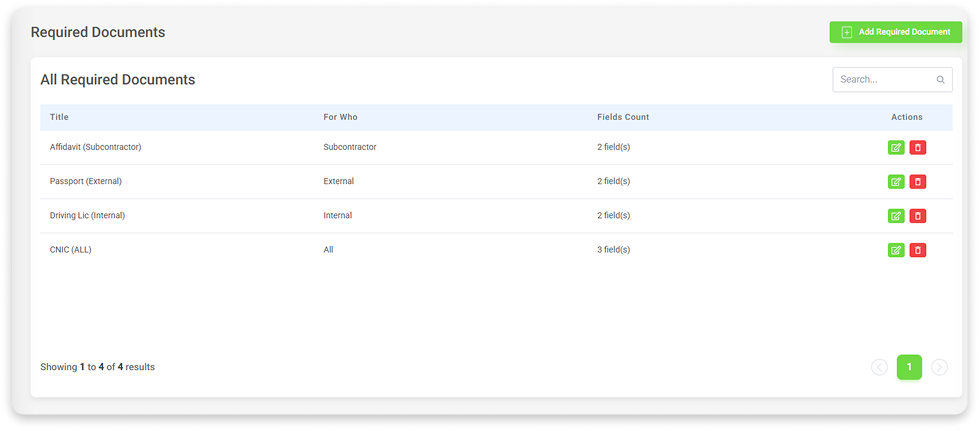
Templates pack a title, target group (internal staff, external contractors, or everyone), and custom fields text, numbers, dates, and image uploads with mandatory flags. Tailor a "White Card" to the letter, or specify subcontractor liability proofs field by field.
They auto-populate in employee profiles' documents tabs. HR verifies, flags gaps, and keeps everyone compliant. Edit or delete templates straight from the table as rules shift – a piece of cake.
For juggling hordes of subs with varied licences and expiries, this turns mayhem into mastery.
No legit construction site lets anyone in without safety inductions. Tracking completion across employees, subs, and site hands? A tracking nightmare.
The WMS induction module sorts it with digital docs, role assignments, and live signature chases.
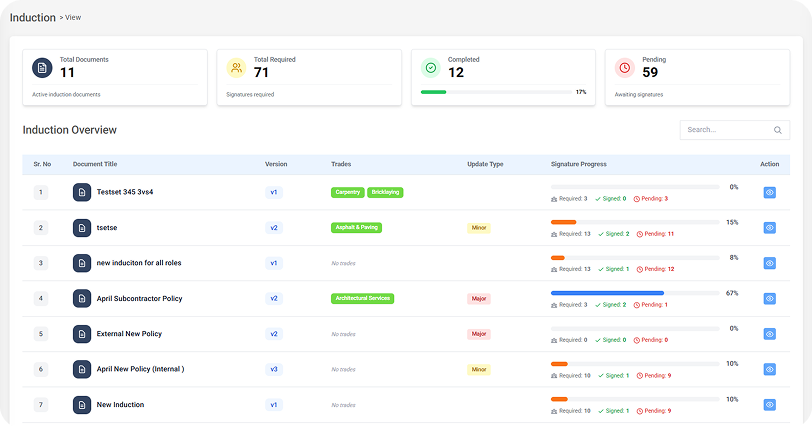
Upload PDFs (up to 10MB) and tag them to roles Internal Employees, Subcontractors, Subcontractor Employees, Site Workers, and Supervisors. Workers get pinged, review, and e-sign via app or interface.
The Induction Overview (/induction/view) dashboard hits you with totals: docs, required sigs, done, and pending. Drill into the table for versions, trades, update types, and progress. The eye icon pops up a modal naming signers and stragglers.
Versioning is clutch V1, V2, and tracking history without losing oldies. Updates the tag as minor (tweaks) or major (big shifts). Majors force re-signs a compliance must when safety rules evolve.
Principals overseeing sub armies across sites? This is your oversight lifeline.
Timesheets fuel fair pay, legitimate OT, and solid safety logs. But in construction, they're often a mess of mistakes.
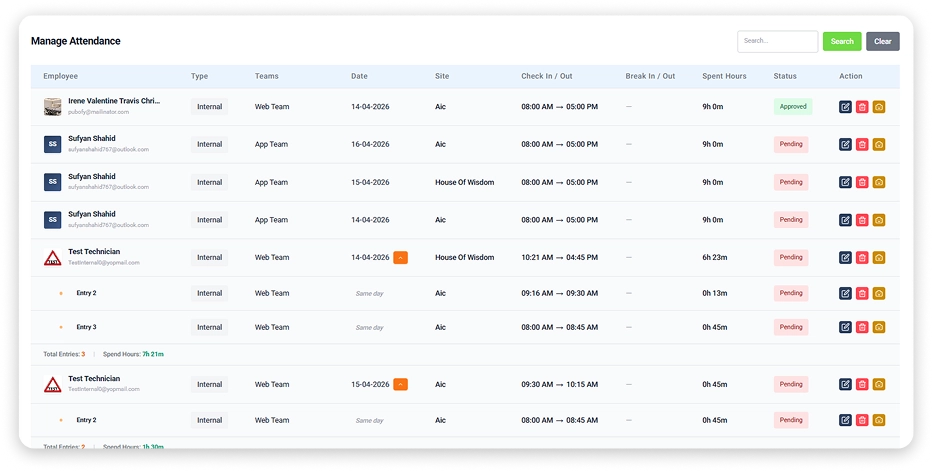
WMS Attendance delivers GPS-backed tracking for check-ins/outs, breaks, and OT live.
HRM → Attendance → Portal gives site/date-filtered live views. The table shows check times, breaks, required vs actual hours, and shortfalls or overruns. External badges flag subs clearly.
Rough sites mean glitches; manual requests let workers or admins fix check-ins/outs. Details like name, type, team, site, and hours go from pending → approved/rejected, with bulk options for volume.
Logs capture everything times, messages, errors, locations. Map view pins check-ins against site geofences, proving presence.
Workers request OT via app; admins approve via portal. Logs employee, site, reason, times, hours, and status. Workflow keeps it authorised before payroll.
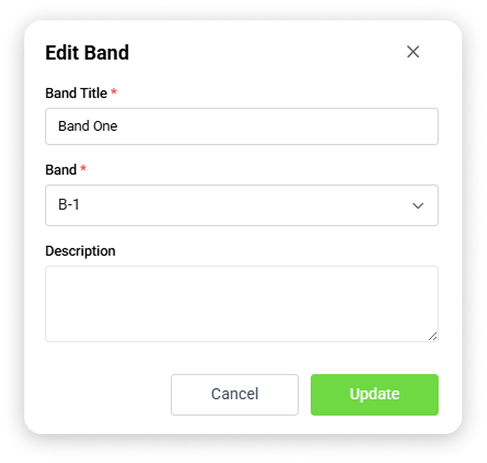
Bands give your crew clear layers executives, site managers, payroll pros, site workers, you name it. Set a title, unique key, and description and assign them during onboarding.
In construction, hierarchy drives pay scales, access rights, reporting lines, and compliance tiers. Tying folks to bands syncs it all seamlessly.
The band table overviews everything, with employee counts. Click icons for a pop-up roster of assignees and profile peeks quick team checks, misfits flagged fast.
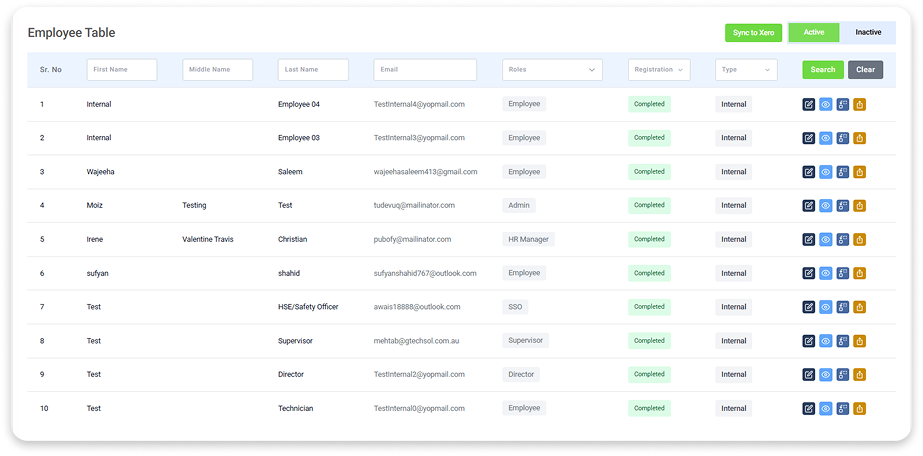
Any solid HRM starts with rock-solid employee records, handled fast and flawlessly. WMS's Employee Management module is that bedrock your one-stop database for every worker's info, job specs, status, and compliance bits, all stored, refreshed, and actionable in a flash.
Jump into HRM → Employees → Manage Employees, and you've got the full lineup at a glance, sifted by name, email, role, onboarding stage, or contract type. Every profile unfolds across tabs like Company Details, Personal Details, Documents, Emergency Contacts, and Access. No more piecing together email scraps or spreadsheet fossils HR has the whole story, right there.
The real smarts shine in how tweakable it all is. In Settings, you set up work permit types, employment types (think full-time, casual, contractor, and so on), teams, worker types, and even work experiences. These choices ripple through the system, locking in uniformity from the get-go.
Roster settings live here too dial in shift templates, paid break lengths, must-hit hours, and workdays so your schedules kick off aligned to how your ops actually run.
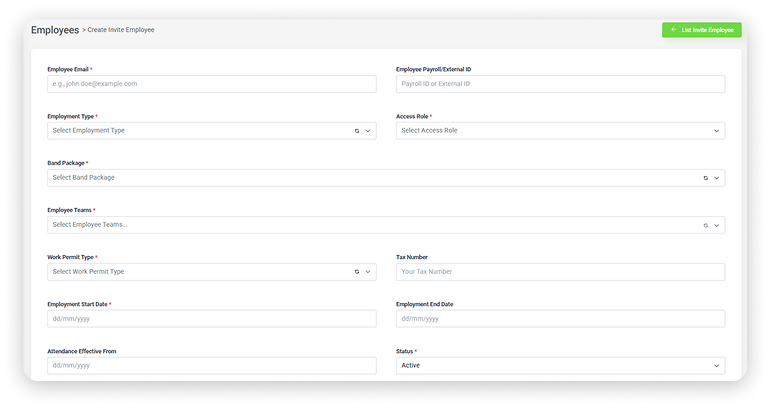
The Employee module's killer app? Self-onboarding. Skip the manual data grind: HR fires off an email invite, and the worker hits the portal web or app to fill in their own details, docs, and contacts.
For firms slamming through contractor intakes, this is gold. Data's fresher because it's straight from the source, not some error-prone relay. HR watches progress live and flips the switch on accounts once everything's squared away and checked.
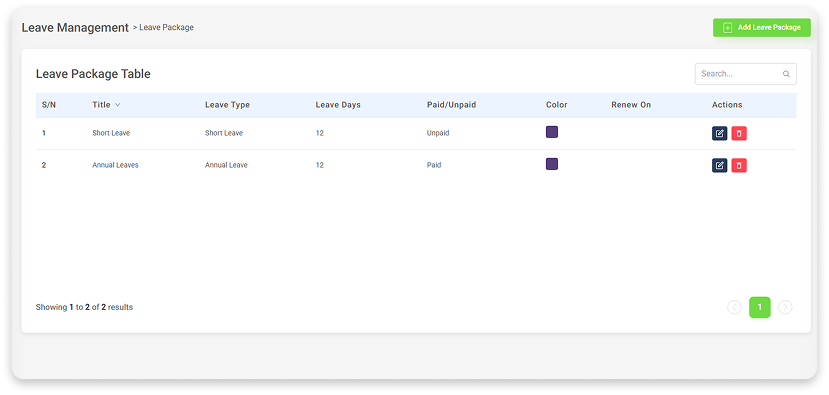
Leave in construction hits timelines hard more than a calendar needs. WMS Leave Management hands HR, managers, and staff a tight system for requests, approvals, and tracking.
Start with leave types (annual, casual, and short) and entitlements. Packages group them days, paid/unpaid, renewals, roles.
Onboard a newbie to a package, and leave it ready no fiddling.
Site workers and office staff alike can fire off leave requests right from the web portal or mobile app keeping things accessible no matter where duty calls. Each request pulls in the basics: employee name, leave package, start and end dates, plus a quick reason. Over in the leave portal, HR and managers get a live snapshot total headcount and who's off right now and handy tabs to sort upcoming, approved, rejected, or expired.
Every entry spells out the remaining balance, say 0/12 annual leave days, so approvers spot overages instantly. Once greenlit, it auto-deducts from entitlements no fiddly manual tweaks needed to keep books straight.
Holidays get their own setup too. Admins plug in public or company dates with name, range, required hours, and notes. The system weaves them into rosters and payroll, dodging those sneaky hour/pay mismatches on public holidays.
Payroll flubs hit the wallet, the lawbook, and morale. WMS Payroll pulls salary, bonuses, and payslips into one hub, feeding off attendance, OT, and leave for dead-on math.
Assign salaries per worker amount and date span. Edit/delete freely; filters hunt by name, dates, and figures. Bonuses log date, amount, and reason for airtight performance trails.
Individual or bulk: pick year/month/employee, and it crunches required/worked hours, OT, leave, deductions, and bonuses into a full payslip with an attendance breakdown and final pay.
Post-payment, mark 'Paid', and spit out PDF receipts. That visibility workers seeing the exact calculation cuts disputes and builds trust.
Construction rostering demands laser focus and bendy adaptability shifts have to sync with project surges, worker gaps, site quirks, and last-minute pivots.
The WMS Roster module nails it with visual calendars in weekly or monthly spreads, bulk tools, and full audit trails.
Shifts pop as colour-blocked slabs with start/end times. Flip between week and month for tactical daily tweaks or big-picture planning. Edit/delete icons sit right there; colour-code them by team, role, or project for at-a-glance clarity.
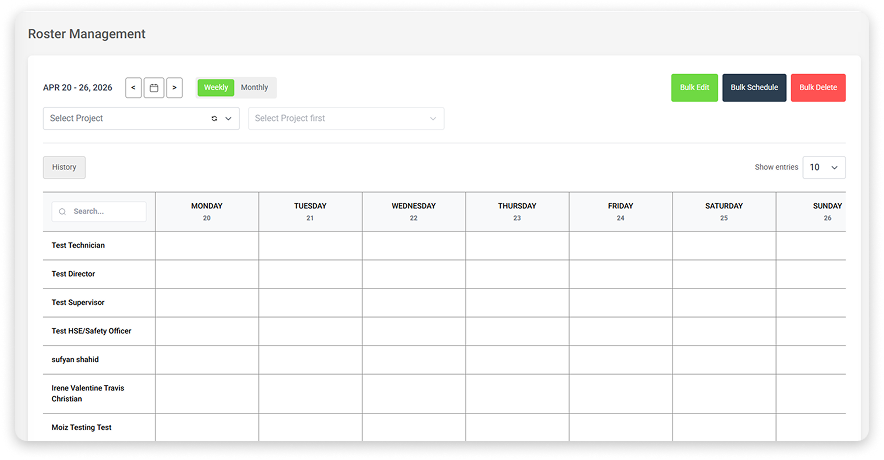
Big teams or repeat patterns? Bulk Schedule lets you blueprint a shift times, breaks, hours, days, and message and roll it out to groups or whole crews in one go.
Bulk Delete mirrors it for scrapping multiples when jobs wrap early. Safeguard confirmations stop slip-ups.
Smart tie-in: rostered shifts can auto-log attendance, slashing manual entry for routine gigs.
Spot an empty slot? Hit the plus, pick 'Apply Leave' bam, schedules update live, nixing the classic double-booking with approved time off.
Super rules are ironclad Down Under. The Superannuation Funds module centralises funds, rates, and details for spotless tracking.
Add funds with a title, percentage, and USI (Unique Superannuation Identifier) the system nudges validation. Searchable list for edits/deletes.
Onboarding links it: workers add fund, rate, USI, and member number in personal details. Feeds STP reporting and keeps it fresh.
WMS shines not in silos but in synergy. Picture it: the self-onboarder finishes docs, slots into a band, gets rostered, GPS checks in, apps leave, and it lands a payslip mirroring reality. All logged, auditable, and role-gated.
For Aussie construction juggling sites, mixes, and mandates this weave isn't nice to have; it's how pros run crews.
Bonus: real-time credential shares; Xero syncs for pay/accounting; mobile for office, highway, or dusty NSW sites.
Construction's grind is eternal. But HR drudgery? Not anymore. WMS swaps patchwork manuals, silos, and guesswork for a tight, all-in-one HRM that just works.
From onboarding ping to payslip PDF, it's handled precise, open, and effortless.
Still juggling apps or god forbid paper and spreadsheets? Time to level up.
Head to workforcems.com.au for details and a demo.
WMS: Tailored workforce management for Aussie construction, trades, and field services.
FAQs
In construction, HRM just means Human Resource Management it's how you manage your people on site. It's not just about hiring; it's about making sure the right people, with the right skills and paperwork, are on the right job at the right time.
HR sends a simple email link. The worker opens it on their phone or computer, fills in their own details, and uploads the required documents. HR double‑checks it once and hits approve. No more paper forms lying around or chasing people for signatures.
Yes. HR uploads the safety documents, assigns them to roles, and can see who's signed and who hasn't. No‑one can be rostered on site until they're signed off, so you always know who's good to go.
If a worker misses a check-in or check-out, they or the site manager can create a manual attendance request with the date, site, and hours. HR reviews it and approves or rejects it. If a lot of people miss the same check-in, HR can approve them all at once.
HR adds each super fund with its name, the contribution rate, and the USI. That info sits in the employee's profile, so super goes to the right fund every time. When it's time for payroll and STP, it's all there no extra spreadsheets to keep up with.
14 Sep 2026•1 min read

11 Sep 2026•1 min read

10 Sep 2026•1 min read