Key Features to Look for in an Integrated Time and Attendance System
From biometric clock-in to multi-location staff hours management, discover the must-have features of an integrated time and attendance system for Australian businesses.

Share this article

Streamline your frontline operations
See how WMS simplifies scheduling, compliance and workforce management in one powerful platform.
The right integrated time and attendance solution can make all the difference between an efficient and compliant operation and hours of wasted time and potential payroll mistakes. No matter whether you have 10 employees or thousands of employees, it is important to know what to expect before you invest.
From biometric clock-in to multi-location staff hours management, this guide explains all of the features, so you can be confident and informed when making decisions for your business.
What Is an Integrated Time and Attendance System?
A time and attendance system that seamlessly captures employee start and end times, logs breaks, absences, and leave, and synchronises all this data with payroll, scheduling and HR software, without requiring manual entry.
It is the "integrated" component that distinguishes modern solutions from simple punch-card software. True integration is when your labour scheduling system, payroll engine and compliance reporting tools all have the same live data in real time.
Workforce Management Systems (WMS) are designed to provide such end-to-end integration for Australian businesses of all sizes and sectors.
Why the Right Features Matter More Than the Price Tag
Most companies that choose an inferior time and attendance system are underestimating the cost. Using unconnected or outdated timekeeping tools creates many downstream side effects, including payroll mistakes, Fair Work violations and hours of manual administration.
By getting the features right from the start, risks are avoided.
1. Biometric Clock-In Capabilities
Biometric clock-in software is a software that uses fingerprint scanning, facial recognition or iris detection to ensure an employee's identity at the point of time they are captured. This will help prevent "buddy punching" which occurs when one employee clocks in for another, costing Australian businesses a considerable amount of money annually in terms of wage leakage.
What to Look For:
- Fingerprint and facial recognition are supported.
- Hands-free application in hygienic critical areas, e.g. food production, health care.
- Site entry/worksite integration with physical hardware.
- Exceptional fallback PIN or proximity card use options
Having a platform with various clock-in options provides your teams with the flexibility they deserve without compromising accuracy and security.
2. Workforce Scheduling Platform Capabilities
The scheduling backbone is the key to scheduling success with any time and attendance system. Without an interoperable rostering and attendance system, you'll be experiencing mismatched data, phantom shifts and under- or over-staffed rosters regularly.
Key Scheduling Features to Evaluate:
| Feature | Why It Matters |
|---|---|
| Drag-and-drop roster builder | Saves managers' hours each week |
| Auto-fill based on availability | Reduces back-and-forth communication with staff |
| Shift conflict detection | Prevents double-booking and compliance breaches |
| Award and EBA interpretation | Ensures correct pay rates are applied automatically |
| Demand-based forecasting | Aligns staff levels with actual business needs |
If your scheduling is directly linked to User time capture, then planned hours always match actual hours worked. No reconciliation required.
3. Automated Payroll Integration
This is a must do for any Australian business. One of the most time-consuming and error-prone parts of the HR workflow is manually moving timesheet data into your payroll system, which automated payroll integration can eliminate.
An integrated solution will auto-calculate:
- These are actually the normal working hours, overtime and penalty rates.
- Public holiday loadings
- Transfer leaves or leave accumulations
- Multi-award and enterprise bargaining agreement (EBA) pay rules
These are the different Payroll Integrations you can look for:
- The third-party providers include Xero, MYOB, ADP, KeyPay, and Micropay.
- Real-time sync (API-based) instead of file exports.
- Gross pay preview prior to pay runs being processed.
- A complete audit record generation from time capture to payroll
With automated payroll, pay runs are right on time, even before you open the payroll screen.
4. Human Resource Management Integration
Time and attendance information is only as valuable as how you use it. If attendance is tied to your human resource management (HRM) system, then you'll have a complete view of each employee: their role, contract type, leave balances, performance history, and compliance track history all in one place.
This link eliminates double data input, lessens onboarding risks, and enables a tidy and documentable offboarding process.
The HRM at WMS seamlessly connects to User information, ensuring that all time data is seamlessly synced to your HR teams without manually searching across various systems. It includes centralized staff database, payroll-ready reports to document management and role-based access control.
5. Real-Time Absence Management Tools
Absenteeism is one of the biggest challenges faced by Australian businesses. Real-time absence management tools provide managers with real-time visibility when an employee calls sick, is late or fails to clock in/out so you can respond before it gets in the way of your operation.
What Good Absence Management looks like:
- Automated notifications to Users via SMS or email if they fail to clock on when they are supposed to.
- Mobile-friendly leave request and approval processes.
- The integration with the calendar of leaves and public holidays.
- Use of the Bradford Factor or points system for repeat lateness
- Trend reporting of absenteeism by team, department, and/or site
HR and operations managers have the control they need, with a live dashboard that lets them know who is in, who is not and who is on approved leave.
6. Mobile Punch-In Application
For people on the move, such as field workers, remote employees, retailers, and anyone who doesn't have a desk job, a mobile punch-in app is a must-have. A punch-in button is not enough for the right mobile punch-in application.
Must-Have Mobile Features:
| Feature | Benefit |
|---|---|
| GPS geofencing | Verifies the employee is at the correct job site before allowing a clock-in |
| Offline clocking | Captures time data even without an internet connection |
| Push notifications | Reminds staff to clock in and out, and alerts managers to exceptions |
| Timesheet self-service | Let employees view and submit hours, with manager approval for edits |
| Shift swap requests | Reduces manager workload for last-minute roster changes |
A comprehensive iOS and Android app designed specifically for Australian shift workers and field staff can truly make a difference to everyday working lives.
7. Sites and Projects Tracking
When employees work at multiple job locations or projects, it is critical to connect employee time directly to the job location and project. If this is not included, you can't accurately measure labour cost per project, determine where your time is going and create meaningful reports for your project manager and your client.
You can assign employees to projects and specific sites during clock-in and this data will be stored on the Sites & Projects at WMS record, providing you with granular visibility of labour distribution throughout your operation.
8. Client / Project time tracking
Consultancies, labour hire, construction and professional services where the billable time of employees is directly related to the client engagement are vital businesses. Otherwise billable hours are lost and client bills are estimates.
A robust system should enable staff to clock in time on a client, project or cost centre and report it back to the software program with no manual effort, and automatically aggregate it to produce reports ready for billing.
With the Client at WMS, it is easy to see time per client or contract, providing you with all the visibility you need to bill correctly and maintain your margins.
9. Time Data's automated invoicing
With the client and project time tracking set up, the next step is automated invoicing. An integrated platform can automatically create accurate invoices based on approved timesheet data rather than manually compiling hours and creating invoices in a separate system.
This eliminates the lag between service provision and billing, minimises invoice disputes and significantly decreases the finance team administrative burden.
With the Approved Time Entries feature, all your time entries are automatically turned into professional-looking Invoices with the Invoices at WMS app, ensuring your cash flow is on track and your billing records are tidy.
10. Overtime Calculation Automation
One of the most frequent causes of manual payroll error and Fair Work complaints in Australia is overtime. Automating overtime calculations isn't just about avoiding payroll mistakes: it's about safeguarding your business against legal issues and empowering managers with up-to-the-minute, informed staffing decisions.
A system that is designed well will:
- Use appropriate overtime rates according to the award/EBA of each employee
- Notify managers in real-time if an employee is close to overtime
- Calculate overtime, double time and applicable penalty rates automatically for you.
- Create an audit-ready report for each pay period
- Identify flagging issues before the cheque is released
11. Safety, Compliance, and Audit Functionality
Compliance reporting is a place where many businesses find their hidden risks start and typically comes after a Fair Work audit. Compliance reporting should be part of the "must-have" features list and not an add-on.
| Compliance Area | What to Look For |
|---|---|
| Fair Work adherence | Automated award interpretation and correct rate calculations |
| Right to Disconnect | Tracking of after-hours contact and unpaid time |
| Record-keeping | Seven-year digital audit trail for all timesheets |
| Break tracking | Automatic logging of rest and meal breaks |
| Underpayment prevention | Pre-payroll alerts for any discrepancies |
| Modern awards | Support for 120+ Australian modern awards |
Whether it's documenting workplace safety, compliance checklists or reporting incidents, Safety & Compliance at WMS is not just about time keeping; it's about having the right information, in the right place, at the right time when it comes to conducting audits or responding to inquiries from Fair Work.
12. Reporting and Workforce Analytics
Data becomes truly useful when you can put it to use. An effective reporting system converts attendance and time to meaningful data to help control labour expenses, analyse attendance patterns and make workforce decisions.
Look for:
- Easy access to customisable dashboards (site, team or department-specific)
- Reports that split labour costs by projects or client.
- Overtime and penalty rates by pay period summary.
- Absence and leave trend reports
- Payroll, financial and compliance-ready file output formats
The Reporting at WMS provides managers and business owners with real time visibility of the whole workforce, reporting that is ready for an audit and designed to meet Australian compliance needs.
13. Multi-Location Staff Hours Management
If you have more than one location, department, or state where your business is located, multi-location staff hours management is a necessity, not an option. If not, you're dealing with individual spreadsheets, different leave policies and data not synced between sites.
Features that can be helpful for multi-site operations:
- A centralised dashboard that supports filtering by location.
- Award and pay rate details by location
- All sites are reporting together in one view
- Manager Level scoped by site/region.
- Here are some of the features of the program that make it powerful for cross-site rostering and shift transfers
That's where a cloud platform, such as a WMS system, can really outperform its on-premise counterparts. Each location is connected to the same real-time data, with the visibility of data permission to ensure data is seen by only one manager in each location.
Feature Comparison: Basic vs Integrated Time and Attendance Systems
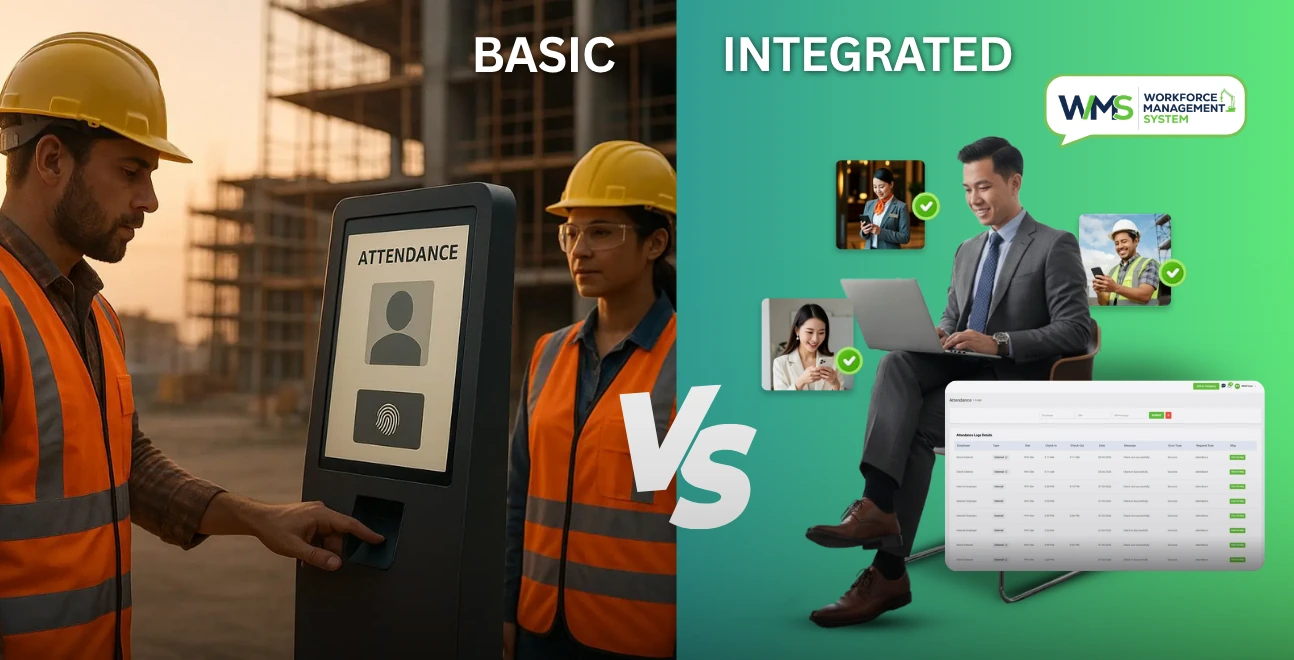
| Feature | Basic System | Integrated System (WMS) |
|---|---|---|
| Clock-in methods | Manual or PIN only | Biometric, mobile, browser, kiosk |
| Payroll connection | Manual export | Real-time API sync |
| Absence management | Basic leave tracker | Real-time alerts and approval workflows |
| Compliance and safety | None or very limited | Full audit trail with Fair Work support |
| Multi-location support | Single site only | Unlimited locations |
| Scheduling integration | Separate tool required | Native, bidirectional sync |
| Mobile app | None | Full-featured iOS and Android app |
| Overtime automation | Manual calculation | Automatic with award interpretation |
| Client and project billing | Not available | Built-in client and invoice modules |
| HR records integration | Not available | Unified HRM module |
| Reporting and analytics | Basic exports only | Real-time dashboards and compliance reports |
Pros and Cons of Integrated Time and Attendance Systems
| Pros | Cons |
|---|---|
| Eliminates payroll errors | Higher upfront cost than basic tools |
| Saves significant admin time each pay cycle | Requires staff onboarding and initial training |
| Real-time visibility across the entire workforce | Integration setup may take a few weeks |
| Built-in compliance confidence for Fair Work | May include features you don't need immediately |
| Scales with business growth | Check data portability before committing to a vendor |
For any business managing more than 10 to 15 employees, particularly in industries with complex award structures like hospitality, healthcare, retail, and construction, the benefits far outweigh the drawbacks.
How to Choose the Right System: A Step-by-Step Framework
- Evaluate existing workflow. Understand the areas of error, delay or compliance that exist now.
- List your non-negotiables. Compliance assistance, mobile access and payroll integration are generally essential for Australian companies.
- Australian compliance readiness check. Are modern awards, Fair Work obligations and local data storage requirements supported?
- Ask to try out a live demo. Try out the platform with your own team and payment structure before making any commitments.
- Evaluate integration depth. API sync is always better than file-based export/import.
- Assess scalability. The system will still work if you double the size of your headcount in the next 2 years?
- Review support and onboarding. Customer support provided by personnel based in Australia is a great benefit for SMBs dealing with hard-to-understand awards.
Final Thoughts
There is no longer a luxury to be an integrated time and attendance system. It is the very backbone of any Australian business that wishes to pay their staff properly, remain compliant with Fair Work legislation and operate day-to-day with efficiency.
What's included in this guide for functionality, such as biometric clock in, automated payroll integration, real-time absence management, billing of clients, safety compliance, and workforce reporting, is just the base level you need to be looking for in an invest-worthy platform.
Workforce Management Systems delivers everything in one package, engineered in Australia to meet the compliance, award structures and business realities faced by businesses daily. Get a complimentary demo and discover the power of the integrated system that can revolutionize the way you manage your workforce.
Optimise your operations with WMS
Streamline scheduling, compliance, and workforce management in one platform.
Frequently Asked Questions
Payroll integration is definitely one of the most important. The most frequent causes of payroll mistakes, non-compliance and underpayment claims are eliminated with a system that automatically uploads accurate, award-interpreted time data to your payroll system.
Biometric systems rely on the fact that no two employees have the same fingerprint or face geometry, allowing them to check in for individual employees. This directly cuts cost for payroll loss due to buddy punching.
Yes. Ideally, the system should have built-in award interpretation engines, which automatically pull the appropriate pay rates, overtime rules and entitlements from the Australian modern awards and enterprise bargaining agreements to ensure the correct rates are calculated, and provide audit-ready records per pay period.
Cloud-based solutions are hosted online, can be accessed from any device, are automatically updated and are typically less costly for SMBs. On-premise systems are more difficult to scale, need constant IT maintenance, and must be installed in their local area. Most of the Australian businesses are now transitioning to cloud-based solutions.
GPS geofencing enables quality mobile apps to provide verification that an employee is in the proper place to clock in. Most also offer offline clocking, meaning that when a user is offline, it saves the time on the device and uploads to the cloud when the user is back online.
If you use an integrated platform, then not. Ideal systems integrate rostering, time tracking, absence management, client billing, and payroll into a single solution to avoid silos and tedious data entry from multiple disconnected tools.
Small to medium-sized businesses can have all of most cloud-based platforms up and running within 2 to 6 weeks. We provide guided onboarding for Australian businesses to get up and running in no time, with no mistakes.
Related Articles
Explore more insights on workforce management, compliance, and operations.

Security Operations and Monitoring Workforce Planning
Plan guard rosters, track live attendance and cover every shift with WorkforceMS. Strengthen security operations and monitoring with smarter workforce planning.

Muhammad Asim
09 Oct 2026

Telehealth and Digital Healthcare Scheduling WMS
Simplify telehealth and digital healthcare scheduling with WorkforceMS. Manage rosters, remote clock-ins and compliance records in one easy-to-use platform.
Muhammad Asim
08 Oct 2026

Healthcare Workforce Management for Aged Care
Simplify rostering, credential tracking and payroll for aged care healthcare teams. Discover how WorkforceMS gives your carers more time with residents.
Muhammad Asim
05 Oct 2026
Ready to secure your operations?
