Tender Management in Construction: How WMS Improves the Procurement Process
Efficient procurement in construction comes down to running tenders properly. Get the right subs for the right price, and your job runs smooth. Mess it up and you're fighting fires.

Share this article

Streamline your frontline operations
See how WMS simplifies scheduling, compliance and workforce management in one powerful platform.
Tender Management in Construction: How WMS Improves the Procurement Process
Efficient procurement in construction comes down to running tenders properly. Get the right subs for the right price, and your job runs smooth. Mess it up and you're fighting fires.
But handling tenders by hand is tough work. Emails everywhere, spreadsheets out of sync, and bids all over the place in terms of format. PMs spend too much time fixing errors and chasing details.
WMS from WorkforceMS fixes that. The Tender module handles the lot in one place, starting from selecting the winner.
Why Tenders Are Make-or-Break
Look, in Aussie construction, nailing the right subcontractors at a fair price isn't optional—it's what keeps your project afloat or sinks it. But let's be real: for most of us project managers and admins, running tenders feels like managing blindfolded. Emails flying everywhere, spreadsheets that don't talk to each other, docs landing with the wrong bloke, bids in formats from hell, and deadlines whooshing by while you're stuck comparing apples to hand grenades. It's exhausting.
Enter the Tender Management module in WorkforceMS's WMS—designed from the ground up to sort this rubbish out. It yanks the whole tender cycle, from scribbling the brief to shaking hands with the winner, into one no-nonsense platform. For construction crews and the like, this isn't some fancy add-on. It's your edge in a cutthroat game.
Role of Tender Management in Construction Procurement
Tender management forms the core of procurement in construction. It ensures project requirements come through crystal clear, suppliers receive fair treatment, and contracts land with the right partner following thorough, apples-to-apples evaluations.
A strong tender system delivers real benefits.
- Better choices for vendors, based on facts, not guesswork.
- Full transparency so everyone sees the process.
- Lower risks by spotting issues early.
- Solid records for compliance and audits.
With WMS, companies simplify procurement and boost efficiency across the board.
So, What's This WMS Tender Module Thing?
It's the dedicated WMS bit that lets you whip up, launch, and project tenders without breaking a sweat. You and your team set the scope, pick a deadline, chuck in the docs, invite subbies, handle their questions, stack up bids for a proper look, and crown the champ—all in one system. No more juggling bloody Outlook, Excel, and WhatsApp groups. Everyone's on the same page, from your site office to the subbie's ute.
Firing Up a New Tender: Dead Easy
Straight from the dashboard, hit Dash → Tenders. Up pops the list—a neat table showing ref numbers, titles, linked projects, status, close dates, and bids so far. Love that at-a-glance stuff; saves me swearing at my screen every morning.
Click "Add Tender", and you're away:
- Give it a straight-up title that says what the job is.
- Link it to your project in the WMS Project bit.
- Set the hard close date.
- Spell out the scope—what's needed, no fluff.
- Lay out the pricing schedule so bids line up.
- List must-have documents, such as certificates or specifications.
This setup forces you to cover the bases. No half-arsed tenders slipping through, and every subbie starts on equal footing.
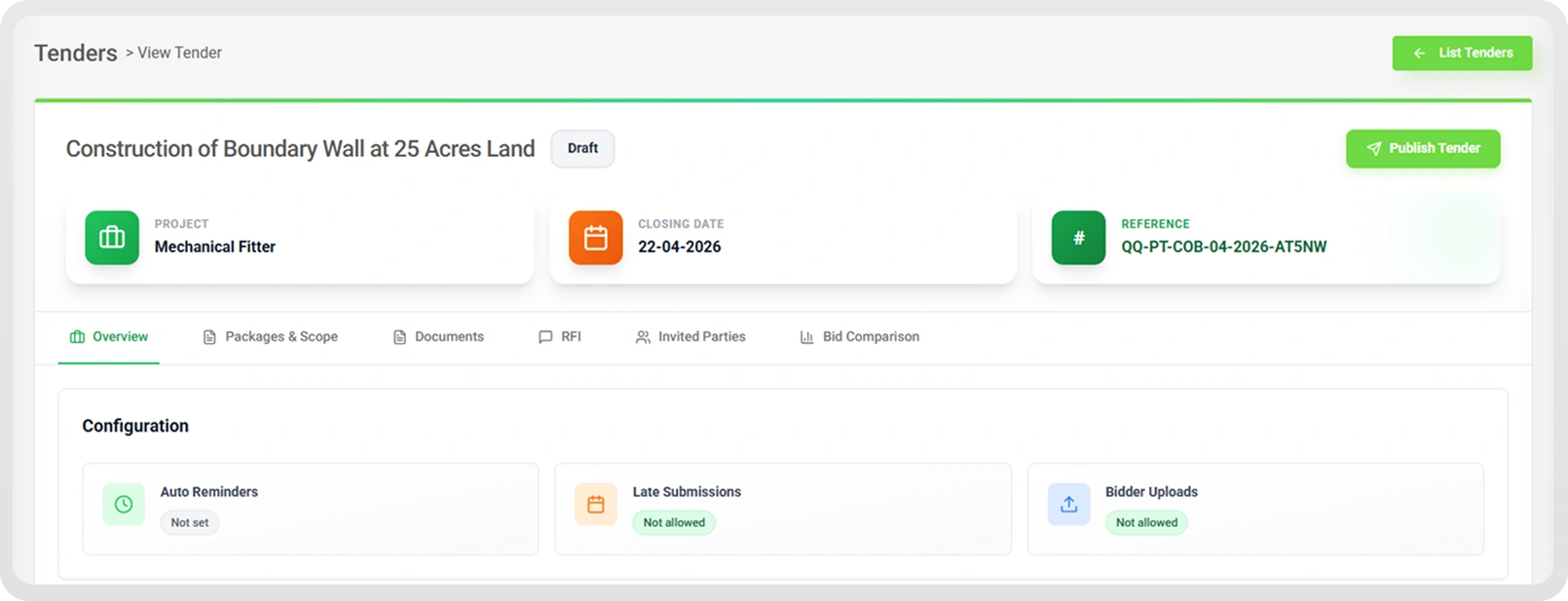
Publishing and Tweaking: Make It Bulletproof
Tender's born in draft mode—tweak it till it's right. The overview page at the top has all the vitals: title, project, date, and ref. Quick as that.
Before you hit publish, sort these:
Auto-Reminders
Set it to ping subbies who ghost you—like a "Oi, two days left" email. Bid turnout jumps without you lifting a finger—a game-changer for big packages.
Late Bids? Your Call
Lock it down with strict timelines or let them in on a case-by-case basis. The rules are clear; no arguments.
Extra Docs from Bidders
They upload quotes, breakdowns, certs and tech notes right there. No email begging later.
All good? Publish. Subbies see it instantly.
Running the Show: Seven Tabs That Actually Work
Once live, seven tabs handle everything. No clutter, just what you need.
Your hub. Project deets, ref, deadline, reminders, rules—all front and centre. Check status in seconds.
Picking the Winner: Decisions That Stick
Bids reviewed? Weigh price, quality and docs. Select in-system—fully logged. Show clients, auditors, or whoever: "Here's how we did it, fair dinkum." Invaluable for compliance headaches.
The Whole Tender Ride, Step by Step
WMS nails the flow:
- Create and link to the project.
- Load docs and scope.
- Invite the crew.
- SBs bid away.
- RFIs are sorted transparently.
- Compare with smarts.
- Pick a winner and close it.
All in-house, no tool-hopping.
Real Jobs, Real Wins
Multi-Trade Mayhem
Juggle concreters, sparks, and plumbers at once—each tender separate but synced.
Audit Nightmares
Docs and logs prove your process; clients love it.
Scaling Up
As jobs pile on, this keeps you sane—no admin explosion.
Bottom Line: Procure Like Pros, Skip the Paper Chase
Tenders are huge in construction, but most tools suck at 'em. The WMS Tender Module fixes that—creation, docs, chats, comparisons, and selections are streamlined and straightforward. Aussie businesses get pro procurement that's transparent and quick.
Ditching emails and Excel? Check out workforcems.com.au for the full rundown or a demo.
WMS: Aussie platform for construction's full cycle—from tenders to site crews.
Optimise your operations with WMS
Streamline scheduling, compliance, and workforce management in one platform.
Frequently Asked Questions
Most tenders go through 7 steps: prep the details, publish them, check bidder quals up front, get submissions in, review and score them, pick the winner, then get the contract rolling. Types depend on the job—open to all, closed to a few, selective picks, direct talks, two rounds, RFP style, RFQ for prices, frameworks for ongoing work, or a straight award if urgent.
You spot the opportunity, decide if it's worth it, plan how to bid, put the content together, review everything, submit, then look back on lessons. Six stages to keep it steady and get better next round.
They're all calls to vendors. An RFP wants your full proposal ideas; an RFT is bidding on exact specs; an RFQ just nails down the quote. Others like RFO, RFI for info, and RFEI to test the waters.
The full process from planning and writing bids to submitting them for goods, services, and projects. Makes sure bids are complete, rule-compliant, sharp on price, and fit buyer needs spot on.
This is how you invite bids from contractors for specific construction work packages. It's a go-to procurement route to line up the services you need on site.
Related Articles
Explore more insights on workforce management, compliance, and operations.

Security Operations and Monitoring Workforce Planning
Plan guard rosters, track live attendance and cover every shift with WorkforceMS. Strengthen security operations and monitoring with smarter workforce planning.

Muhammad Asim
09 Oct 2026

Telehealth and Digital Healthcare Scheduling WMS
Simplify telehealth and digital healthcare scheduling with WorkforceMS. Manage rosters, remote clock-ins and compliance records in one easy-to-use platform.
Muhammad Asim
08 Oct 2026

Healthcare Workforce Management for Aged Care
Simplify rostering, credential tracking and payroll for aged care healthcare teams. Discover how WorkforceMS gives your carers more time with residents.
Muhammad Asim
05 Oct 2026
Ready to secure your operations?
