Top Workforce Management System Features and Benefits
Discover the key features and benefits of Workforce Management System for construction. Improve scheduling, compliance, productivity and reporting with WorkforceMS.

Share this article
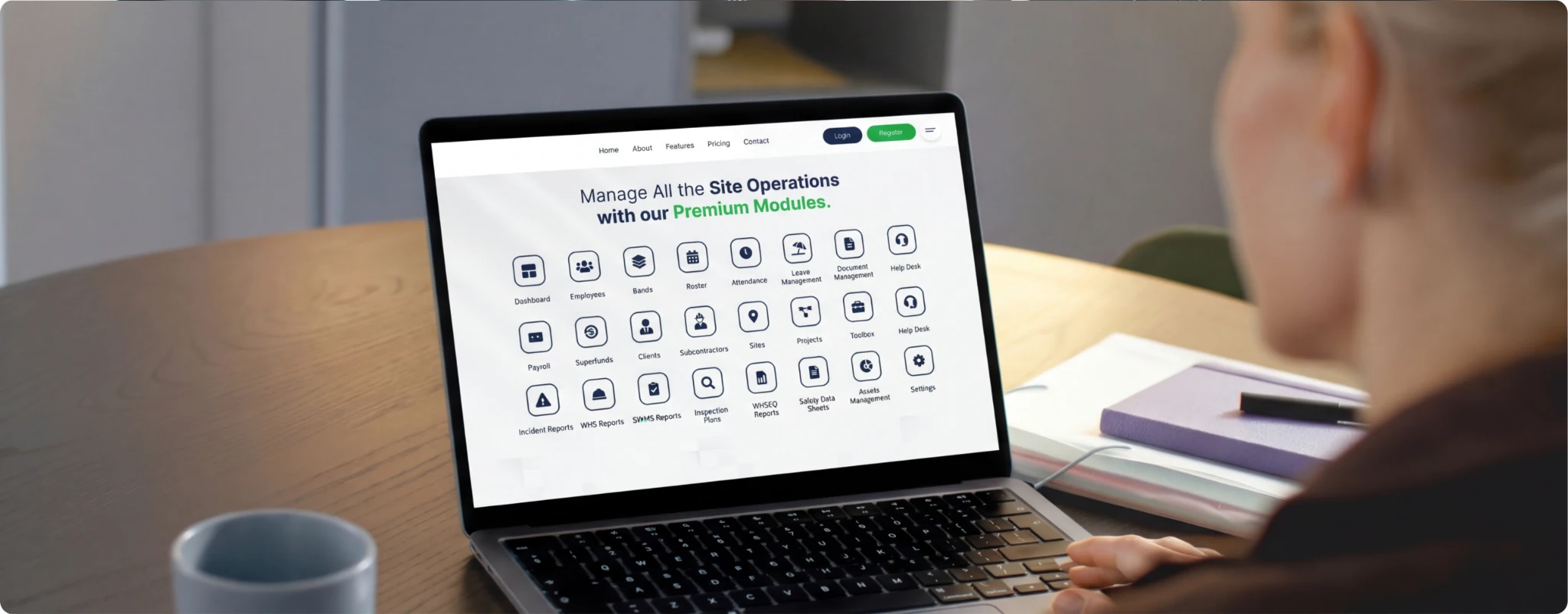
Streamline your frontline operations
See how WMS simplifies scheduling, compliance and workforce management in one powerful platform.
Running a construction company is really tough. You have to deal with workers at different sites, meet tight deadlines, make sure everyone is safe and keep track of how much you are spending on labour every day. If you are still using paper to keep track of hours worked, spreadsheets or a bunch of different software tools, you are making things harder for yourself than they need to be.
Construction companies need a way of doing things. You need a system that puts everything in one place, from scheduling workers to tracking hours, making sure you are following safety rules and paying workers. This is where a good workforce management system comes in; it is very helpful for construction companies.
The good thing is that the right Workforce Management System can really change how you run your company. Instead of using a lot of different tools and doing things by hand, you can use one system to manage your entire workforce. Many construction companies in Australia are starting to use this kind of system in 2026. There are some very good reasons for this.
In this guide we will go over the features and benefits of a good workforce management system. We will look at how these systems can solve problems that construction companies face and why using the right system can really help your company make more money and make your workers happier.

What is a Workforce Management System for Construction Companies?
A workforce management system for construction companies is a software solution that helps these companies manage their workforce in one place. This means they do not have to switch between tools to create schedules, track attendance, process payments and keep compliance records. Everything is done within one platform.
For construction companies this is very important. Unlike standard businesses, construction companies have to manage workers at different job sites, work with subcontractors and labour hire staff and follow safety rules at the same time. A workforce management system makes it easy to handle these tasks whether you are working from the office or on site using a mobile app.
A workforce management system for construction companies is different from human resources software. It is designed for the construction industry and understands the unique demands of this industry. It knows about shiftbased work teams that are spread out in locations, certification requirements and compliance obligations in Australia. This means that construction companies do not have to spend a lot of time setting up the system and can start using it.
The good thing about a workforce management system for construction companies is that it is easy to use. Your team does not need a lot of training to use it. The system should be simple enough that any team member, from site supervisors to office administrators, can use it with confidence from the start.
Why Construction Businesses Need a Workforce Management System
General human resources systems do not understand the construction industry. They are designed for employment relationships with standard office hours and fixed locations. The construction industry is different. Workers operate at sites, work variable shifts and need specific certifications that must be maintained and verified.
A general human resources platform treats workforce management as a task. A construction focused system sees it as an advantage. It is designed around how the construction industry works, with project based timelines, seasonal fluctuations, trade specific skills and complex compliance rules in Australia.
When you use a system designed for the construction industry, you avoid the hassle of adapting a tool that was not built for your industry. You do not waste time customising workflows that should work automatically. You do not struggle with features that do not align with how your business operates.
Investing in a purpose built workforce management system for construction companies pays off through implementation, higher adoption rates and better results. Your team gets to work with software that understands their reality from the start. A workforce management system for construction companies is an investment for any construction business.
Understanding the Core Components of Workforce Management
General human resources systems do not understand the construction industry. They are designed for employment relationships with standard office hours and fixed locations. The construction industry is different. Workers operate at sites, work variable shifts and need specific certifications that must be maintained and verified.
Workforce Planning and Forecasting
To run a construction operation, you need to plan your workforce really well. A good workforce management system helps you figure out how many workers you will need for a project, based on how long it will take, what resources you have and what skills are required. This way you can avoid not having workers when you need them, and you can also avoid having too many workers and wasting money.
The system should let you look at what happened in the past, see how your staffing has been, and make guesses about what you will need in the future. If you know what you need ahead of time, you can use your resources in a way and avoid making expensive decisions at the last minute.
The system can also help you predict problems before they happen. You might notice that your business is busier at times of the year or that your team is missing some important skills or that some workers' certifications are about to expire. If you know about these things ahead of time, you can come up with solutions other than just reacting to problems.
Modern workforce planning systems are connected to your project pipeline so you can see what projects are coming up and plan your workforce needs months in advance. As projects move forward, you can see what workers you will need and when. The system will even tell you if you do not have workers with the right skills so you can make a plan to hire more or train the ones you have.
For example, if you need electricians for three projects in the quarter but you only have two available, the system will let you know. Then you can decide whether to train electricians, hire some or change the project schedule. This way you can be in control of your workforce rather than just reacting to things as they happen.
The system also lets you try out scenarios like what if a project gets delayed or what if you lose an important subcontractor or what if a big client gives you a new project suddenly? You can use the system to see how these things would affect your workforce and make a plan for what you would do.
Time and Attendance Tracking
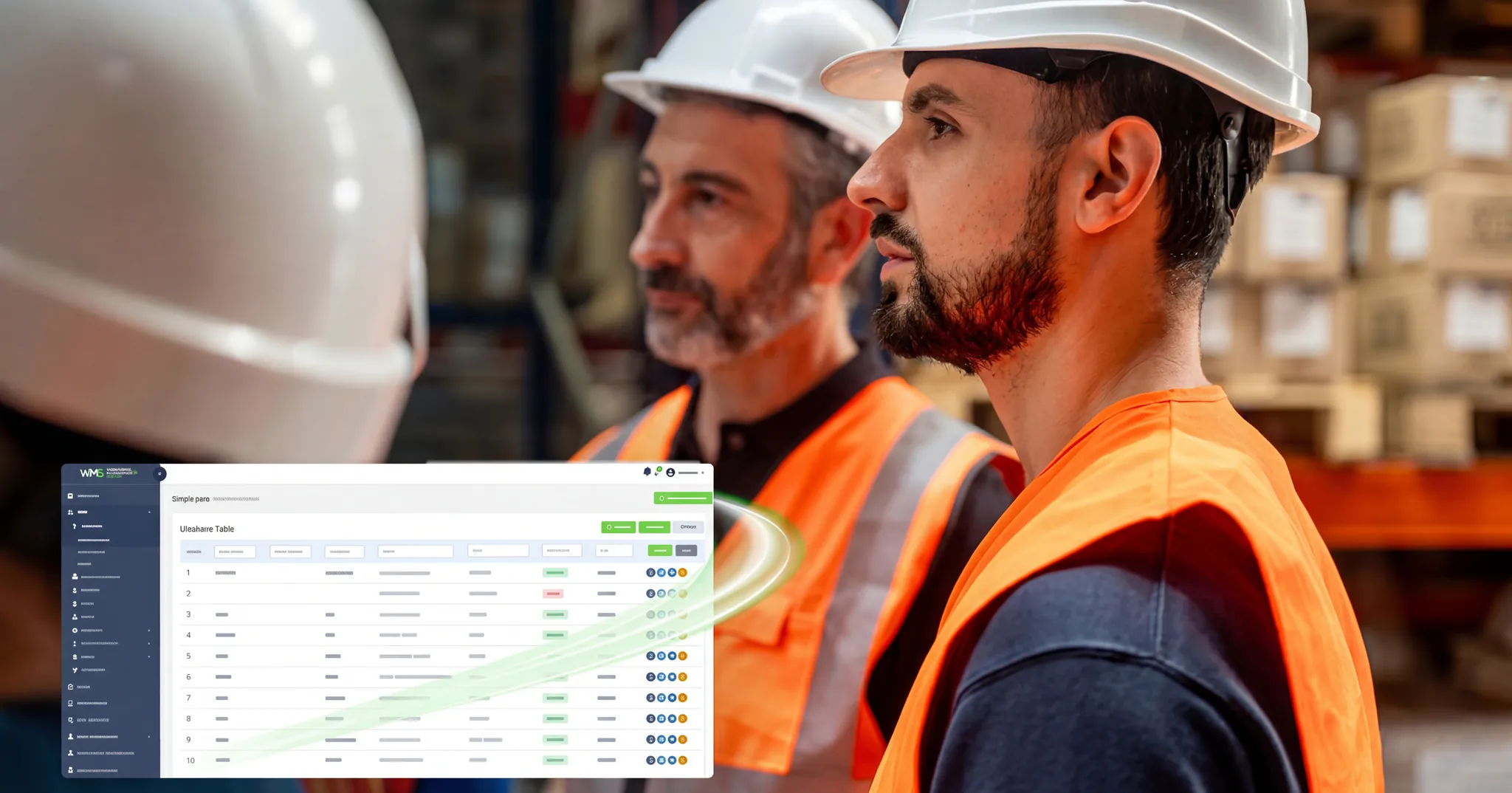
To make sure your workers get paid fairly and that you can manage your costs, you need to track their time. Modern workforce management systems have ways for workers to clock in and out, including mobile apps, GPS and geofencing. This means workers can clock in from anywhere on the job site.
Geofencing is a technology that automatically clocks workers in and out when they arrive or leave a job site. This prevents workers from clocking in for each other. It also prevents time theft. This is good for you and your workers because it makes sure everyone gets paid correctly and it also helps you manage your labour costs.
Mobile time tracking is really helpful because workers can clock in and out when they are in an area without internet. The system will also let you know if workers are getting close to overtime so you can manage your labour costs. Some systems use things like fingerprints or facial recognition to make sure the time tracking's accurate. This makes a record that you can use to prove everything is fair and correct.
Employee Scheduling and Rostering
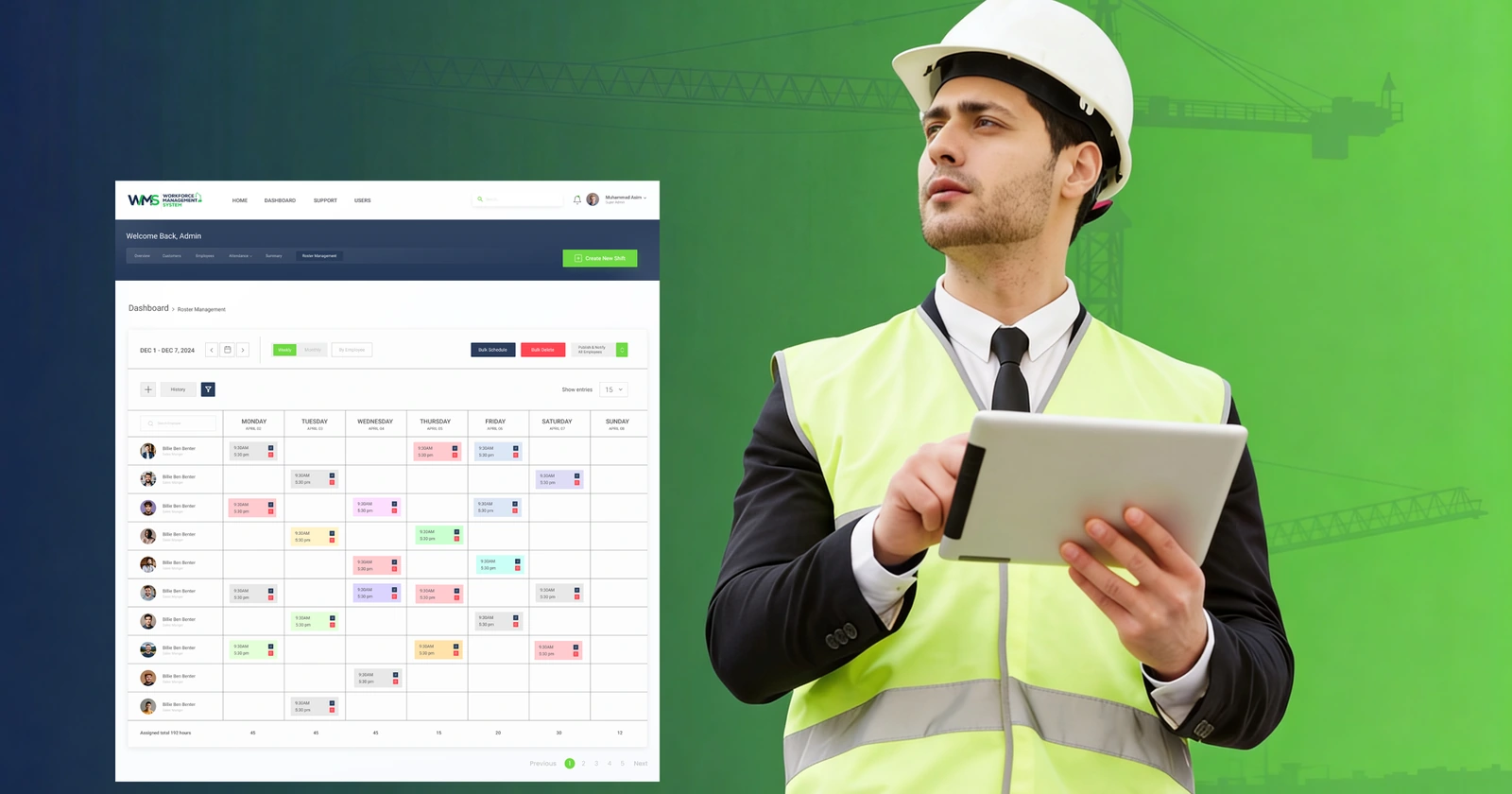
Making worker schedules can be very hard, especially if you have construction sites. A good workforce management system can help with this by doing tasks for you and giving you a view of what is happening. You can assign workers to projects based on their skills and certifications. When they are available without scheduling them for two things at the same time.
The system will help you make sure you have the number of workers for each project based on how much work needs to be done. This will help you save money by not having many workers, and it will also make sure you have enough workers to do the job safely and efficiently.
The system will alert you to any schedule issues, such as a worker being booked for two things at the time or a certification being close to expiring. This way you can make changes to the schedule quickly. Respond fast to unexpected things, like bad weather or a worker being absent.
The system also sends notifications to your team so everyone stays updated on schedule changes. Workers get phone alerts so you do not have to track them down to let them know what is going on. This makes everything more efficient. Helps everyone stay on the same page, with mobile time tracking and employee scheduling and rostering.
Challenges Solved by Workforce Management Systems
Manual Scheduling Errors and Double Bookings
Scheduling workers for construction jobs can be really tricky. When schedules are managed using emails, spreadsheets or just people's memories, mistakes happen all the time. For example, a worker might get booked for two projects on the day. A supervisor might schedule someone for a job they're not qualified for.
These errors cause problems. Projects suffer when workers are missing. Workers get frustrated when they're scheduled for situations. Morale drops when communication about schedule conflicts is poor. A proper workforce management system eliminates these errors. It automatically detects conflicts. Prevents bookings from being saved.
The system also checks if workers have the skills and certifications. If a project needs workers with a qualification, the system only suggests workers who actually have that qualification. This prevents workers from doing tasks they're not capable of.
Time Theft and Buddy Punching
Time theft costs construction companies a lot of money every year. It's when workers clock in for colleagues who haven't arrived or stay clocked in during breaks. Traditional time tracking methods, like paper timesheets or basic clock systems, don't protect against dishonesty.
Modern workforce management systems have mechanisms to prevent fraud. Geofencing technology tracks when workers arrive at or leave job sites. Biometric options, like fingerprint or facial recognition, make it impossible for one person to clock in for another. GPS tracking verifies locations, making it clear if someone clocks in remotely when they should be on site.
The transparency these systems provide actually stops dishonesty. People at work know that their location is being recorded and their time is being tracked. This means that over time the workplace becomes a place where people are honest and take responsibility for their actions.
Compliance Gaps and Regulatory Risks
The construction industry has to follow a lot of rules. There are laws about work health and safety rules from Fair Work and things that are required by the modern award. These rules are really complicated. If you do not follow them, you can get in trouble. When people try to follow these rules on their own, they can make mistakes. These mistakes can cause problems, like fines, or the project might even get shut down.
The Australian construction industry and the companies in it can also get sued. Compliance and Australian construction are closely related, and compliance is very important for construction. A workforce management system maintains digital records of all compliance activities automatically through Safety & Compliance modules. This provides protection and significantly reduces audit risk.
Inefficient Communication and Information Silos
When workforce information is scattered, communication becomes inefficient. Project managers don't know real time staffing levels. Payroll doesn't know about scheduling changes that affect pay. A centralised workforce management system becomes the source of truth.
When information changes, it's immediately available to everyone who needs it. Notifications can be automatically sent to parties. This transparency improves coordination across the business. Project managers know exactly who's assigned to their project and for how long. Finance understands labour costs over time. HR can see compliance status without asking. The entire organisation operates with current information.
Real World Examples of Workforce Management Benefits
Example 1: A Residential Building Company
A residential building company was building houses in three suburbs. They had trouble scheduling workers. Workers moved between projects as needed. Site managers used spreadsheets and phone calls to coordinate. This often led to bookings. Payroll also had hours. Compliance documents were all over the place.
Double bookings almost disappeared. Payroll processing time went down by 70%. Compliance audits became easy. All documents were digital and organised. The company saved $15,000 each month. This was enough to pay for the system times over.
Example 2: A Site Commercial Contractor
A commercial contractor had 25 projects in different regions. They were losing track of labour costs. Project managers didn't know if projects were staying within budget for labour. The company couldn't see where skilled workers were or if they were being used efficiently. Payroll was complicated. Different regions had pay rates and classifications.
The system helped project managers see labour costs in time. They could adjust staffing if a project was going over budget. The system showed that some regions had workers who were not busy enough. Others were overworked. By moving workers around based on demand, the company used workers 18% efficiently. They didn't need to hire staff.
Example 3: A Specialised Trade Contractor
A specialist contractor had trained workers. They needed to ensure workers had the certifications. Keeping track of certifications for workers was overwhelming. The company was worried about scheduling workers or finding out during an audit that certifications had expired.
The system solved this problem. It tracks each worker's qualifications. It sends reminders before certifications expire. It prevents workers from being assigned. During audits the company can produce all documentation easily. The peace of mind from having compliance managed automatically is priceless.
Advanced Features That Make Quality Systems Stand Out
Geofencing and GPS Technology
Quality systems have features like geofencing. This allows workers to automatically clock in and out when they enter or leave a job site. It stops workers from forgetting to record their time and eliminates the need for clock-in. When combined with GPS tracking, it verifies that workers are on site. This technology stops time theft. Protects workers. For example, if a worker gets hurt, the system knows where they are. In case of a security incident, you have records of who was present. You can use location data for safety investigations.
Intelligent Forecasting Algorithms
Advanced systems use data to make predictions about labour needs. These systems learn from your data, such as patterns, project types and worker availability. They make predictions over time. This helps with key decisions. When bidding on projects you can estimate labour costs and requirements. When planning resource deployment, you understand demands. When forecasting cash flow, you can predict labour costs accurately. The system helps you make decisions about labour and resources. It uses your data to make predictions about labour demand. The predictions help you plan and make decisions.
Implementation Considerations for Your Business
Choosing Between Cloud and On Premise Solutions
Modern workforce management systems are cloud-based. They offer advantages like accessibility from automatic updates and no need to maintain servers. Cloud solutions have mobile functionality. They work reliably in constructions, sometimes unstable, internet environments.
On-premise solutions give you control. They require IT resources to maintain and update. For construction companies cloud based solutions are the better choice. They offer accessibility, reliability and lower total cost of ownership.
Data Security and Privacy
Given that your system will contain employee information, security must be a top priority. Look for systems that use encryption. They should maintain backups and comply with privacy regulations. They should have access controls. Your data employee information, location data, payment details needs to be protected.
- Ask vendors about their security certifications.
- Ask about their procedures.
- Ask about their data protection policies.
- Understand where your data is stored.
- Understand who has access to it.
Make sure the system complies with privacy requirements and industry standards.
Change Management and Employee Adoption
Technology implementation success depends heavily on employee adoption. If workers and managers don't embrace the system, benefits won't be realised. Invest in training. Communicate the benefits clearly. Involve employees in implementation decisions when possible. Start with pilot projects or limited rollouts. Get feedback from users. Refine your approach before rollout. Recognise that change takes time. People need support to develop habits.
Getting Workers On Board: Inductions and Compliance
Before any worker steps onto a construction site, they must complete safety inductions. They must meet compliance requirements. This is non-negotiable in the construction industry. A comprehensive workforce management system streamlines the onboarding process. Workers can complete inductions online. They can upload licences. They can submit documents entirely online. This first approach eliminates paper forms. It reduces delays. It ensures your team is compliant and ready to work from day one.The system maintains a repository of all worker credentials. It maintains certifications and compliance documents. This makes it easy to verify qualifications at a glance. It ensures nothing slips through the cracks.Automated reminders ensure certifications never lapse unexpectedly. The system tracks expiration dates. It alerts you well in advance. It gives you time to arrange renewals before they become.
Comprehensive Leave Management
Tracking leave requests and leave balances manually is tedious. It's error-prone. It creates confusion among your team. A modern workforce management system centralises all leave management. It makes the process transparent and straightforward for everyone involved.
- Employees can view their leave balance at any time.
- They can submit leave requests directly through the system.
- Managers can. Decline requests efficiently.
- The entire process becomes streamlined.
- It saves hours of administrative work.
The system automatically calculates leave entitlements. It does this based on your company policies, awards and employment agreements. Different leave types vacation leave, personal leave, long service leave and carers' leave are tracked separately. They are processed according to award obligations.
Integration with HRM systems ensures leave data flows seamlessly into payroll processing. When leave is approved, the system automatically adjusts work schedules. It notifies affected parties.
Shift Based Scheduling and Rostering
Construction work operates on shift-based schedules. They often vary from day to day based on project demands and seasonal factors. A workforce management system purpose-built for construction understands these requirements. It makes scheduling significantly easier. Managers can update schedules rapidly.
- They can assign workers based on their skills and certifications.
- They can send notifications immediately when changes occur.
The system prevents booking and scheduling conflicts automatically. Licence expiration reminders integrated into the scheduling system. They mean you'll never accidentally schedule someone for work they're no longer certified to perform.
Built In Compliance Management
Compliance is genuinely complex in the construction industry. You're required to navigate work health and safety laws. You must navigate Fair Work requirements, modern award obligations and trade licensing regulations simultaneously. The penalties for non-compliance range from fines to project shutdowns. This makes compliance management absolutely critical.
A dedicated workforce management system includes compliance tools. They keep track of worker certifications automatically.
Rather than maintaining spreadsheets or filing cabinets of certificates. Everything is. Organised within one system.
The system sends alerts when certifications are about to expire. It gives you time to arrange renewals before workers become non-compliant for assigned work.
Payroll System Integration
Payroll in construction is genuinely complicated. You're juggling pay rates. You're calculating overtime. You're adding site allowances. You're handling subcontractor payments. You're managing tax obligations all whilst ensuring every worker receives timely payment.
Integration between your workforce management system and payroll platform eliminates data-entry. It eliminates errors. When workers clock in and out through the workforce management system. That time data flows automatically to payroll.
Real Time Dashboards and AI Powered Reporting
One of the valuable aspects of modern workforce management systems is their advanced reporting capability. Rather than spending hours extracting data from sources. You get real-time dashboards showing exactly what's happening with your workforce now.
- An AI-powered reporting engine identifies trends.
- It highlights anomalies.
- It provides insights without requiring you to manually sift through data.
- You can understand labour cost trends.
- You can identify performing teams.
- You can spot emerging compliance issues.
Mobile Accessibility and Offline Functionality
Construction supervisors and workers spend most of their time on site. Not in offices. A workforce management system must work brilliantly on devices. It must function when internet connectivity is limited or unavailable, which is common on construction sites. Modern systems are designed first. They have interfaces that work perfectly on smartphones and tablets. Workers can clock in using GPS or geofencing.
- They can submit leave requests.
- They can view their schedules.
- They can access pay information directly from their devices.
Integration with Sites and Projects
When you have a lot of workers and projects, you need a system that can handle everything. This system should be able to talk to your project management tools. You can use it to connect the workers you assign to each project and see how many hours they work on each one. You can also check if the project is on budget when it comes to labour costs. This helps the people in charge of the projects understand how labour costs right now instead of finding out later that they spent too much.
The system can also make sure that all the workers on a project have the certifications or training. This way you can avoid problems. Keep the projects going without delays. You can see which workers are assigned to each project, how many hours they have worked and whether the project is on budget.
Safety Management and Incident Reporting
Safety is very important when it comes to construction. Your system should have features that help with safety. There are tools that make it easy to do safety checks, write down incidents and keep track of hazards at all your sites. The people in charge can use their phones to fill out checklists so safety checks get done all the time and the records are kept automatically. This is better than using paper because it can get lost or damaged. The system also lets them take pictures and add documents, which's more than paper can do. When something bad happens, it is easy to report it with the help of forms that guide you. The system will ask for all the details like photos and what happened right away.
This is very helpful if something bad happens and you need to investigate. You can also keep track of hazards so you can see what risks there are and what you need to do to fix them. This makes the site safer for everyone.
The system can also work with tools, like Toolbox and pre-start systems, to keep track of safety talks and attendance. This creates a record of safety which shows that you care about your workers.
Asset Management Integration
Construction companies have a lot of assets like equipment and vehicles. If you connect your workforce management system to your asset management system, you can make your operations more efficient. You can keep track of who's responsible for each asset and make sure they are maintained properly. This helps prevent loss and makes the assets last longer. You can also make decisions about what assets to invest in.
Tender Management and Project Task Management
For bigger construction companies, it helps to connect your system to tender management and project task management systems. This way you can have a workflow from start to finish. You can identify what labour you need for a project. Then use that information to plan and schedule your workforce. The system can also help workers understand what they need to do on each project. You can assign tasks and track progress. Mark them as complete, which makes everyone accountable.
Reporting and Performance Analysis
The system should be able to give you reports on everything that is going on with your workforce. You should be able to see all the data in one place instead of having to look at multiple systems or ask different departments for reports. You can create reports that show labour costs by project, worker, site or time period. You can also see which workers are productive or where they might need more training.
The system should be easy to use for people who are not technical. You can create custom reports by dragging and dropping the information you want without needing help from IT.
Workforce management systems are really good at helping with cost visibility and budget control. One of the things about these systems is that they let you see how much money you are spending in real time. You do not have to wait until the end of a project to find out that you spent way too much on labour.
The system shows you what your labour costs are likely to be based on the hours people are actually working, the hours you think they will work and how many people you have on staff. This helps project managers see if they are spending a lot of money and figure out what is going wrong. If a project is going to cost more than you thought, you can try to find out why. Is it because people are not working efficiently? Is the project bigger than you thought? Are you using your workers in that way?
This helps you make changes during the project or after it is over. Some projects just need more labour than you thought. If you find this out early, you can change the way you are doing things, like adding staff or changing the way people work. This helps you avoid spending much money on labour. These productivity improvements can really help your line. If a construction company can improve productivity by 10%, it can make a big difference.
Finally, workforce management systems help you make decisions about your business. You can see how many workers you have, what you will need for future projects and if you can grow your business without hiring more people. You can see which projects make money from a labour perspective. You can see which teams or supervisors are the most productive. You can even see where you need to provide training. This helps you make decisions based on facts rather than just guessing.
Common Implementation Mistakes to Avoid
Not Involving Your Team in Selection. Choosing a system without input from people who use it daily can lead to adoption. Get your site managers, supervisors and workers involved in demonstrations. Ask for their feedback on usability and features. The system should work for them, not against them. When people help choose the system, they feel more invested in its success. They feel like they own the decision and are more likely to use the system.
Underestimating Training Requirements
- Easy-to-use systems need proper training.
- People must understand how to do their tasks.
- These tasks might include clocking in, submitting leave requests and managing schedules.
- Plan training and give people enough time and resources.
- Make sure you have support for users after launch.
- People will have questions. Need help with situations they don't know how to handle.
- Having support makes adoption smoother.
Ignoring Mobile Accessibility
If most of your workforce works on construction sites, the system must work well on devices. A poor mobile experience can hurt adoption. Make sure the system you choose works on mobile devices. It should not just be a version of a desktop system.
Failing to Integrate
The real power of workforce management systems comes from integration with other business systems. If time tracking doesn't flow into payroll, compliance isn't integrated with scheduling and projects aren't connected to resource planning, you lose benefits. Make sure your system integrates properly with your existing systems. Work with the system vendor to set up data flows and automations. This will eliminate data transfer. Manage Multiple Sites Easily Managing two construction sites is different from managing ten or twenty. As you grow, administrative complexity grows exponentially. A centralised workforce management system gives you visibility across all your operations.
You don't need to grow your team as much. You can oversee what's happening across all sites from a dashboard. You can see staffing levels at each location, labour costs by site, compliance status across the portfolio and any emerging issues.
This visibility helps you allocate resources strategically. You can make decisions for your business rather than managing each site separately. The system scales with your business. Whether you're managing two sites or twenty, the same platform provides the visibility and control. You don't need tools for different scales of operation. The system grows with you.
Managing Subcontractors and Labour Hire
If your company uses subcontractors or labour hire workers, using a system that manages subcontractors makes everything easier. This includes checking if they are allowed to work for you and paying them.
You can keep all the papers for your subcontractors in one place so you can check they are okay to work for you before they start. The system automatically tracks the hours your subcontractors work, makes invoices for you and pays them on time. This makes things better with your subcontractors. Helps keep your company safe from problems with the rules.
Reporting to Clients and Talking to Them
When you are working on a project or need to tell clients about your workforce, the client reporting feature helps. You can make reports that show how you are using labour, how productive your workers are, and if you are meeting the rules. This shows clients how you are doing the project.
Being open with clients helps build trust and can give you an edge when you are trying to get a project. Clients want to know what is going on with their projects, and being able to give them timely reports shows that you are professional and responsible.
Future Trends in Workforce Management Systems
The workforce management systems of the future will be really smart. They will use artificial intelligence and machine learning to help manage the workforce. This means they will do more than track and report things. Artificial intelligence will actually help manage the workforce. It will use algorithms to predict when we need more people to work. Machine learning will make schedules automatically based on what's best for the company.
Artificial intelligence will help us find problems we did not know we had. For example, it might find out that one project is not as productive as another project. It might find out that some teams work better on certain types of projects. It can even suggest ways to make things better like changing the way we staff our projects.
We will also have chatbots and virtual assistants to help with questions from workers. They can answer questions about time off, schedules or pay. This means our human resources team can focus on important things.
Remote and Hybrid Workforce Management
More and more people are working from home or in offices and on site. This is especially true in construction. People like site engineers and project managers work in different places. Construction companies are also hiring people to work from home like engineers and designers.
The workforce management systems of the future will make it easy to manage these types of workers. They will help us communicate and make sure projects are finished on time. This will be an advantage for construction companies. They will be able to attract the workers by offering them the chance to work from home or have a flexible schedule.
Advanced Analytics and Predictive Capability
The systems of the future will be able to tell us what we should do, not what is happening. They will be able to say things like we should move workers from one project to another to make money. We should give our workers some training because we will not have enough workers soon.
We will have updates every day, not every month. This means we will know what is happening with our workers and our projects every day. We will be able to make decisions and respond to changes.
Integration with Broader Business Systems
The workforce management systems of the future will work with business systems. This means that project management, accounting and safety systems will all be connected. If we make a change in one area, it will automatically change in other areas. This will make things easier. Reduce errors.
For example, if we change the scope of a project, the system will automatically change the budget and forecast. It will also tell the people about the change. This will help us make decisions and reduce mistakes.
Blockchain for Compliance and Credentials
New technologies like blockchain will change the way we verify credentials and compliance information. Workers will have credentials that are verified through secure networks. This will make it faster, more reliable and more secure.
It will also help us trust that our compliance documents are correct. The blockchain will provide proof that our workers have the training and credentials. This will be very helpful for audits and regulatory purposes
The year 2026 is a time to invest in workforce management.
The construction industry is changing fast. Companies that use workforce management get a competitive advantage. They are more efficient, safer and comply with rules better. As more companies use methods, those that do not will fall behind.
Clients want construction companies to be professional and transparent. If you can show them the status of a project in time and prove that you comply with safety rules and manage your workforce well, you will have an advantage when winning contracts and keeping clients happy.
Young workers want to use technology at work. They want to be able to see their schedules and pay information on apps, not on paper. They want to be able to talk to their managers. Workforce management systems help you attract and keep workers by giving them the technology they want.
The construction industry has a problem with not having enough workers. If you can offer workers conditions, like flexibility and transparency, and use technology to make their work easier, they will want to work for you instead of another company.
Rules and regulations in the construction industry are getting stricter. Companies need to comply with work health and safety rules, fair work rules and other regulations. If you have a system in place, it will be easier to comply with these rules. If you are still using processes, you will struggle.
Labour costs are going up in the construction industry. If you can improve productivity, reduce errors. Use your workers more efficiently; you will save money. Workforce management systems can help you do this, which makes them a good investment.
The construction industry is changing a lot.
Old ways of doing things like using paper timesheets and spreadsheets to schedule workers do not work well anymore. Companies that still use these methods are choosing to be inefficient and are wasting time and money on tasks instead of doing productive work.
A good workforce management system is not a luxury; it is necessary for construction companies that want to compete. Investing in a system will pay for itself because it will make your company more efficient, reduce errors and help you make more money on your projects. It will also help you keep your workers happy.
The companies that will win contracts in 2026 and beyond are the ones that can show they are excellent at operating, complying with rules and managing their resources well. A modern workforce management system gives you the tools and information you need to compete in the construction industry.
Workforce management is very important for construction companies.
- Workforce management systems are the key to success in the construction industry.
- Investing in workforce management is an idea for construction companies.
- Workforce management is crucial for the success of construction companies in 2026.
Workforce Management for Different Business Type
Small to Medium Builders
For smaller construction companies, using a workforce management system might seem like too much. It's actually very helpful for them because it automates the paperwork that would otherwise take up a lot of the owners' and managers' time.
A small builder with 10 to 15 workers can spend over 10 hours a week on managing schedules, tracking time and processing payroll. That's time the owner could use to win projects or manage client relationships. A workforce management system does this work automatically, freeing up time for important things.
For builders cloud based systems that are easy to set up are ideal. You want to start using it without a complex setup. Look for systems designed for construction that come with sensible defaults rather than requiring a lot of configuration.
Specialist Trade Contractors
Specialist contractors, like electricians, plumbers and air conditioning specialists, have needs. Their workers need certifications and licences that must be kept up to date. They work on small projects. Following rules is critical because breaking them can literally stop work.
Workforce management systems designed for trades should make it simple to manage certifications. Include features that help with compliance for specific trades. Scheduling workers across small projects is critical, so the system must handle this efficiently.
Large Contractors with Multiple Sites
Contractors managing many projects at the same time across multiple locations need a sophisticated workforce management system. They need to see what's happening across all sites' reporting capabilities and integration with broader business systems.
For these companies being able to customise the system becomes important. They may need to adapt the system to their processes and integrate it deeply with existing systems. Vendor support and implementation services become more critical because the implementation is more complex.
Subcontractors and Labour Hire Services
If your business provides workers to contractors, your workforce management needs are different. You need to track which workers are deployed to which client projects, manage rates for clients and generate accurate invoicing.
The system must handle deploying workers to clients, manage client specific requirements and compliance, and streamline invoicing and payment collection. Integration with accounting systems is critical because your revenue depends on invoicing.
Implementation Timeline and Getting Started
Phase 1: Planning and Evaluation. This is where you start with workforce management challenges – your workforce management challenges. You need to think about where you're losing time with your workforce management challenges. Where are errors occurring with your workforce management challenges? What compliance risks concern you most with your workforce management challenges? Understanding your workforce management challenges helps you evaluate solutions for your workforce management challenges effectively.
You should research options for your workforce management challenges, talk to vendors about your workforce management challenges, ask for references about your workforce management challenges, and ideally see demonstrations of how the system would work with your data for your workforce management challenges.
Phase 2: Selection and Negotiation. This is where you negotiate terms for your workforce management challenges. Once you've narrowed down your solutions for your workforce management challenges, negotiate terms for your workforce management challenges. Most vendors offer some flexibility on pricing for your workforce management challenges, especially if you're willing to commit to terms for your workforce management challenges. Understand exactly what's included for your workforce management challenges and what support you get for your workforce management challenges. What training is provided for your workforce management challenges?
Ensure the contract includes an implementation plan for your workforce management challenges, a training schedule for your workforce management challenges and support terms for your workforce management challenges. Understand how long implementation will take for your workforce management challenges and what resources you need to allocate for your workforce management challenges.
Phase 3: Implementation and Data Migration. This is where you implement your workforce management challenges solution. Implementation timelines vary depending on your company size and system complexity for your workforce management challenges. Cloud based systems typically implement faster than on premise solutions for your workforce management challenges. Most implementations take 6 12 weeks from contract signing to deployment for your workforce management challenges.
You will need to spend time preparing your data for your workforce management challenges. Existing employee information for your workforce management challenges, historical compliance records for your workforce management challenges and project data for your workforce management challenges need to be migrated to the system for your workforce management challenges. The quality of this migration significantly impacts how well the system works for your workforce management challenges.
Phase 4: Training and Launch. This is where you train your team on your workforce management challenges solution. Before going with your workforce management challenges solution, your team needs training on your workforce management challenges solution. Different roles need training on your workforce management challenges solutions. Managers need to learn administration and reporting on your workforce management challenges solution, whilst workers need to learn basic functionality like clocking in and viewing schedules on your workforce management challenges solution.
You should plan for support in the weeks immediately after the launch of your workforce management challenges solution. People will have questions and encounter situations they don't know how to handle with your workforce management challenges solution. Having resources available to help makes the transition smoother for your workforce management challenges solution.
Phase 5: Optimisation and Continuous Improvement. This is where you continuously improve your workforce management challenges solutions. After the launch of your workforce management challenges solution, continue monitoring and improving your workforce management challenges solution.
Gather feedback from users about what's working with your workforce management challenges solution and what could be better with your workforce management challenges solution. As people move more comfortable with your workforce management challenges solution, they'll discover capabilities they didn't realise existed with your workforce management challenges solution.
You should plan check ins to assess whether your workforce management challenges solution is delivering the promised benefits. Are you actually saving the time you expected with your workforce management challenges solution? Are you seeing productivity improvements with your workforce management challenges solution? Is compliance easier to manage with your workforce management challenges solution? Use results to guide further optimisation of your workforce management challenges' solutions.
Conclusion
The construction industry needs ways to manage things because it still uses old methods and separate tools that cause problems and mistakes. A good system for managing workers can do four things at the same time: it can save time on paperwork, cut costs, help companies follow rules and make employees happier.
A good platform for managing workers puts everything in one place, including schedules, time tracking, making sure companies follow rules, paying employees, reporting and talking to workers. This means you do not have to use different tools and do things by hand, which makes your whole operation better and easier to manage.
The things we talk about in this guide are what make a system for managing workers different from old ways of doing things. Being able to schedule and track time automatically, making sure companies follow rules, paying employees, making reports and being able to use the system on a phone all work together to create a system that really works for construction companies.
If you are still using paper to track time or separate software tools, you are not just wasting time. You are also taking risks and losing money. The right system for managing workers can completely change how your business works, which can help it grow, be safer and be a place for your team to work.
The construction companies that are doing well in 2026 know that managing workers is very important. It is not a tool for doing paperwork. It is a way to get ahead of other companies and make every part of your business better. If you are ready to stop using old methods and start using modern ways to manage workers, now is the time to invest in a system that is made for construction companies. Your team, your projects and your business will all benefit from this decision.
Optimise your operations with WMS
Streamline scheduling, compliance, and workforce management in one platform.
Frequently asked questions
A workforce management system is really helpful because it does a lot of tasks for you. It makes schedules for your workers. Keeps track of who is absent. It also helps with things like time off. Paying your workers. You can use a workforce management system to make your work easier. It helps you to manage your workers. A workforce management system is good for your business. It helps you to manage your time.
It depends a lot on how big the company is and how complicated the system gets, but most cloud-based options tend to go live in about 6-12 weeks, starting from the time the contract is signed and ending at full deployment. If you want the rollout to feel smoother, it helps to involve your team in the selection step; don't rush that part, invest in hands-on training, and make sure you have dedicated support resources ready right after launch.
Data security is very important. Good systems that manage workers in the cloud use encryption. They also make backups and follow Australian rules about privacy. Systems from known companies are usually more secure than ones you install on your own computers. This is because they have teams that focus on security and have systems in place. Your data, like employee details, where they are located and payment information, should be protected with encryption. They will also let you keep backups of your data.
Workforce management systems benefit construction companies of all sizes. Small to medium builders with 10-50 workers often see the greatest return on investment because they typically waste significant time on manual administrative work. Specialised trade contractors benefit from automated certification tracking that prevents compliance failures. Large contractors with multiple sites gain unparalleled visibility across all operations without needing to expand their admin team proportionally.
The answer is that workers are more likely to use it if they help choose it. They want to know how it will benefit them. Many workers like that systems are transparent. They can check their schedules, ask for time off and see their pay information on an app. This makes them feel valued and informed. Most companies find that workers initially resist the change. Once they experience the benefits of simplified processes and faster approvals, they start to appreciate the new system. Construction workers and managers will likely have the experience. They will see that the new workforce management system makes their lives easier.
Related Articles
Explore more insights on workforce management, compliance, and operations.

Security Operations and Monitoring Workforce Planning
Plan guard rosters, track live attendance and cover every shift with WorkforceMS. Strengthen security operations and monitoring with smarter workforce planning.

Muhammad Asim
09 Oct 2026

Telehealth and Digital Healthcare Scheduling WMS
Simplify telehealth and digital healthcare scheduling with WorkforceMS. Manage rosters, remote clock-ins and compliance records in one easy-to-use platform.
Muhammad Asim
08 Oct 2026

Healthcare Workforce Management for Aged Care
Simplify rostering, credential tracking and payroll for aged care healthcare teams. Discover how WorkforceMS gives your carers more time with residents.
Muhammad Asim
05 Oct 2026
Ready to secure your operations?
