Best Construction Workforce Management Software in Australia (2026)
Construction workforce management software connects scheduling, safety compliance, payroll and site communication into one platform, so field updates reach the office in real time. WorkforceMS is built specifically for Australian builders who need GST, BAS and Fair Work compliance handled automatically, not bolted on.
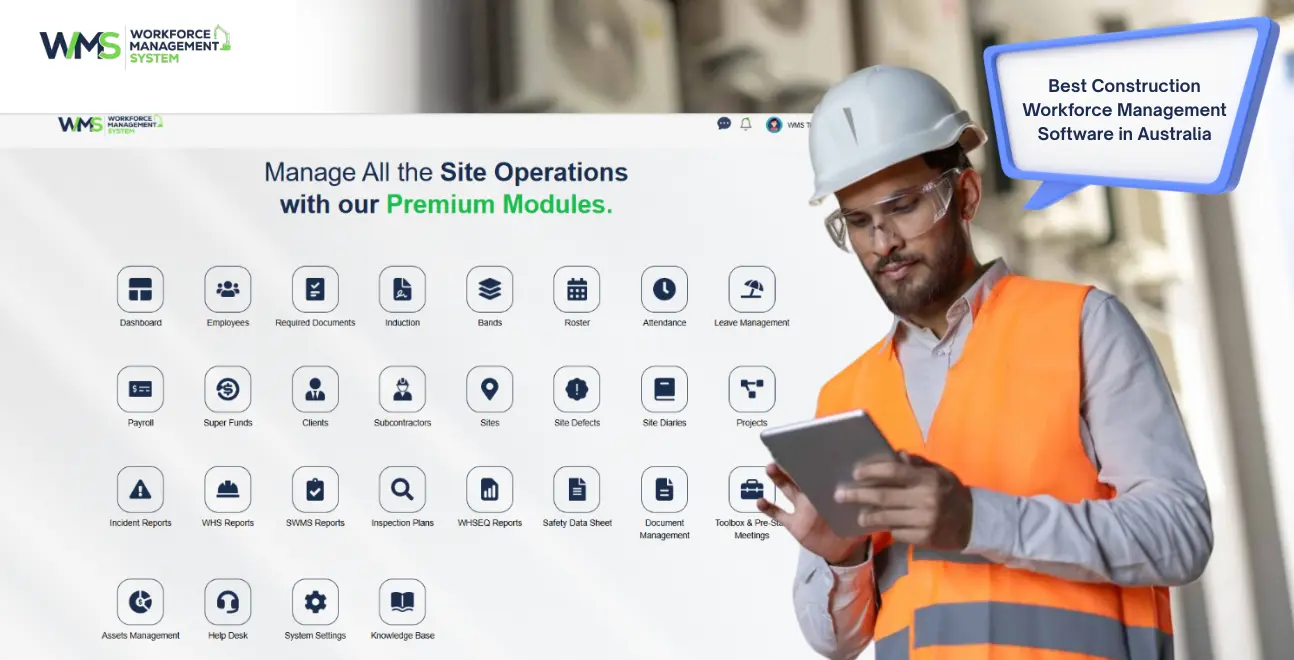
Streamline your frontline operations
Construction workforce management software connects scheduling, safety compliance, payroll and site communication into one platform, so field updates reach the office in real time. WorkforceMS is built specifically for Australian builders who need GST, BAS and Fair Work compliance handled automatically, not bolted on. Compare it against Procore, Buildxact and Buildertrend below.
Introduction
Running a construction crew across multiple sites in Australia usually means juggling a scheduling spreadsheet, a group chat, a paper safety checklist, and separate software for invoicing. Each disconnect creates risk: a missed variation approval, an underpaid award rate, or a safety form that never makes it back to the office.
Construction workforce management software solves this by giving builders one connected system (scheduling, documents, compliance and payroll) accessible from the office or the ute. This guide compares the leading Australian platforms, breaks down real pricing, and shows you exactly how to choose based on your crew size and compliance needs.
Why Spreadsheets Are Costing Builders Money
Spreadsheets can't sync in real time, which means scheduling conflicts, unpaid variations, and missing safety records are discovered after the damage is done, not before.
The hidden cost of manual tracking
When a foreman doesn't know a variation was approved, or an invoice gets paid twice, it's rarely a one-off; it's the default outcome of disconnected systems.
Builders using dedicated scheduling software complete projects roughly 23% faster on average, largely from better trade coordination and less idle time between tasks.
Project delays cost Australian builders an average of $12,000 per project, which makes reliable software a high-ROI switch rather than an added expense.
What Is Construction Workforce Management Software?
It's a cloud platform that lets builders plan, schedule, budget and monitor jobs from one place, syncing site crews and the office team in real time so both sides work from the same data.
Field-to-office sync, explained
Workers clock in, complete safety checklists, and update task status from a mobile app on-site. That data syncs instantly to the office dashboard, giving project managers a live view of every active job without phone calls or end-of-day paperwork.
Core modules to expect
| Module | What It Handles |
|---|---|
| HRM | Employee records, onboarding, and compliance documentation in one place |
| Client | Client details, contacts, and job history linked to every project |
| Subcontractor | Subcontractor onboarding, compliance checks, and payment tracking |
| Sites & Projects | Site setup, crew assignment, and project-level cost tracking |
| Tender Management | Tender preparation, submissions, and win/loss tracking |
| Project Task Management | Task assignment, progress tracking, and deadlines by project |
| Safety & Compliance | Incident reporting, compliance checklists, and audit-ready records |
| Toolbox & Pre-start | Pre-start checklists and toolbox talks logged against each site |
| Asset Management | Equipment tracking, maintenance schedules, and site allocation |
| Invoices | Client invoicing linked directly to approved hours and project costs |
| Reporting | Cross-module reporting on labour cost, compliance, and project performance |
Scheduling Crews Without the Group-Chat Chaos
Drag-and-drop scheduling tools assign crews and resources in minutes, and automatically flag conflicts before a job is double-booked.
Real-time crew visibility
Instead of texting a roster change to five people, a schedule update pushes to every affected worker's app instantly, cutting the "did you see my message" back-and-forth that eats into a foreman's day.
Getting GST, BAS and Fair Work Compliance Right
The strongest platforms calculate GST and BAS-ready figures automatically and apply Fair Work award interpretation to payroll, removing the manual reconciliation that causes underpayment risk.
Why this matters more in construction
Builders manage casual, part-time and subcontracted labour across multiple awards simultaneously. Software with native award interpretation reduces the audit risk that spreadsheets simply can't catch.
Xero and MYOB sync
A two-way accounting integration means timesheets and invoices flow into your books without manual re-entry, one of the single biggest time-drains reported by small builders.
Subcontractor and Site Compliance Management
A dedicated subcontractor module tracks insurance, licences and compliance documents automatically, flagging an expired trade licence before it becomes a safety or legal issue.
Toolbox talks and pre-start checklists
Digital pre-start forms create an auditable record of daily safety briefings, critical if WHS compliance is ever questioned after an incident.
WorkforceMS vs Procore vs Buildxact vs Buildertrend
| Platform | Best For | Standout Feature | Starting Price (AU) |
|---|---|---|---|
| WorkforceMS | All-in-one, field-to-office teams | Real-time compliance + scheduling sync | Custom (demo-based) |
| Procore | Large commercial projects | Full project lifecycle control | Custom (enterprise, often $10K+/yr) |
| Buildxact | Small builders, fast estimating | Quoting and takeoff speed | From ~$149–300/month |
| Buildertrend | Residential builders | Client communication portal | From ~US$199–499/month |
Why it matters: Procore's enterprise pricing suits large commercial contractors with dedicated PM staff, while Buildxact leans toward estimating-heavy small builders. WorkforceMS sits in the middle, with full compliance and scheduling depth without Procore's enterprise complexity.
Common Mistakes When Choosing Construction Software
- Choosing on price alone: the cheapest plan often skips scheduling or compliance modules, forcing a second purchase later.
- Ignoring GST/BAS integration: software that doesn't sync with your accounting system creates manual reconciliation that erases any time saved elsewhere.
- Overlooking subcontractor tracking: without it, insurance and licence compliance becomes a manual, error-prone process across every trade on site.
Must-Have Integrations: Xero, GST and Fair Work
Prioritise native Xero or MYOB sync, automated GST/BAS-ready reporting, and Fair Work award interpretation. These three eliminate the most common sources of manual admin in Australian construction.
What the Data Says About Software vs Spreadsheets
Builders using dedicated scheduling software complete projects roughly 23% faster (McKinsey Construction Report). Combined with the ~$12,000 average per-project delay cost reported by Master Builders Australia, even a modest reduction in delays pays for a mid-tier platform within one or two projects.
Construction Software vs Generic Project Management Tools
Generic tools like Trello or Asana handle task boards but have no native GST/BAS logic, no Fair Work award interpretation and no site-specific safety forms, meaning compliance still happens manually, outside the tool.
The compliance gap
A generic PM tool can track that a safety form exists; it can't calculate whether your payroll matches the correct award rate. That gap is exactly what construction-specific platforms are built to close.
Choosing Software by Business Size
Small builders should prioritise fast estimating and ease of use; mid-tier commercial builders need stronger subcontractor management; civil contractors need real-time cost tracking suited to earthworks.
- Small-to-medium builders: favour quick setup and client communication
- Commercial builders ($20M+): need full lifecycle control across larger subcontractor networks
- Civil contractors: need cost management tuned to earthworks and infrastructure
2026 Trend: AI-Assisted Scheduling
The clearest shift this year is predictive scheduling and cost forecasting. Platforms now flag likely budget overruns or scheduling conflicts before they happen, rather than reporting on them after the fact.
How to Choose the Right Platform in 5 Steps
List your top three daily admin pain points (timesheets, variations, compliance forms).
Shortlist platforms that solve those specific problems, not just general project management.
Confirm Xero/MYOB integration and Fair Work-compliant payroll handling.
Trial the mobile app with your actual field crew before committing.
Compare total cost of ownership, not just the advertised monthly price.
Conclusion
Choosing construction workforce management software in Australia comes down to matching the platform to your crew size and compliance needs, not picking the cheapest or most familiar name. Platforms that handle GST, BAS and Fair Work compliance natively save the most admin time, and the ROI shows up fast: faster project completion and fewer costly delays.
WorkforceMS is built for builders who want scheduling, compliance and payroll connected in one system instead of stitched together from five different tools. Book a WorkforceMS demo to see how field-to-office sync works for your crew.
Book a WorkforceMS demoOptimise your operations with WMS
Streamline scheduling, compliance, and workforce management in one platform.
Frequently Asked Questions
A cloud platform connecting scheduling, payroll, safety compliance and site communication so office and field teams work from the same live data.
Some platforms offer limited free tiers, but full-feature versions are generally paid, with cost scaling by team size and modules selected.
Small-builder tools typically start around $149–300/month; enterprise platforms use custom pricing based on headcount and modules.
Tools focused on fast estimating and client communication suit small-to-medium builders best, while all-in-one platforms suit teams wanting compliance handled natively.
Most major Australian platforms, including WorkforceMS, offer native or certified Xero and MYOB integration for timesheets and invoicing.
GPS-enabled time clocks paired with mobile task management give office teams near real-time visibility of attendance and task progress.
Construction management software adds trade-specific tools (safety compliance, award-rate payroll, subcontractor tracking) on top of standard scheduling and task boards.
Startup costs vary widely by trade and licensing requirements; a dedicated startup cost guide can give you a full breakdown for your situation.
Profitability depends heavily on project type, overheads and admin efficiency, and software that cuts admin hours directly improves margin.
Centralised software is the main lever: it lets you add crews and sites without a proportional increase in admin headcount. See our scaling guide for the full framework.
Related Articles
Explore more insights on workforce management, compliance, and operations.

Top AI Solutions To Manage Construction Workforce
Explore the top AI solutions for managing a construction workforce, from onboarding to payroll and safety, with human review built in.
WorkforceMS Team
14 Sep 2026

Streamline Job Tracking with AI Construction Management Software
Discover how AI construction management software streamlines job tracking, project planning, risk alerts, defect reporting and safety compliance.
WorkforceMS Team
11 Sep 2026

Skills and Compliance Management for Construction Teams
Manage skills and compliance for construction teams with WorkforceMS. Track licences, SWMS, inductions and audits in one workforce management system.
WorkforceMS Team
10 Sep 2026
Ready to secure your operations?
