Security Monitoring and Alarm Response with Predictive WMS
Improve security monitoring and alarm response with a predictive WMS. Map risks, send the right guard fast and keep every incident record in one place.

Share this article
Streamline your frontline operations
See how WMS simplifies scheduling, compliance and workforce management in one powerful platform.
Security Monitoring and Alarm Response with Predictive WMS
With an alarm come the minutes, and each minute is important. Effective security surveillance and alarm activation rely on information about which sites are potentially dangerous, which guards are on hand and what to do next. This guide illustrates how predictive tools enable security teams to act quicker and plan smarter.
Predictive Risk Mapping for Security Teams
All sites are not alike. A quiet office park on a weeknight is very different from a construction site on a Friday night or a busy shopping centre that has valuable tools to steal from. Risk mapping examines all incidents, times, locations and site features that have occurred in the past to highlight the areas of greatest risk. This allows managers to have a good understanding before the first shift is even programmed.
This can be used to identify patterns with predictive tools. If several burglaries are taking place at certain gates at particular times, a manager may be able to schedule additional coverage at that time. This eliminates guesswork and aids teams in spending guard hours where they are needed. Also, clients realise that their site is safeguarded by a plan, not fortuitously.
Spotting Patterns Early
It's easy to overlook patterns when reports are located in various files. An incident, alarm and site note history provides trends over weeks and months. An increase in false alarms at a single location may indicate faulty detection equipment, and/or another increase in after-hours activity calls for additional patrols.
Early Signs allow teams to take action to prevent the development of a small issue. These patterns are kept fresh in everyone's mind with regular reviews.
Security Monitoring and Alarm Response Systems
Monitoring and alarm response is the combination of three things: problem detection, notification to appropriate people, and help despatch. Control rooms monitor alarms, cameras and sensors, and when an alarm sounds, a decision needs to be made promptly. Is it an actual hazard, a false alarm or equipment malfunction? The quicker it's resolved, the safer the site will be.
Steps are clearly marked for each alarm type and assist the operators in maintaining their calm under pressure. It's people that matter more than technology. There should be a guard, close and ready to go and clear instructions. If the control room is able to view who is on duty and where, it can despatch the best rather than the first person they can reach. Those few minutes can be saved with that small change.
Predictive Threat Detection
Predictive threat detection involves making predictions based on previous information. Does not work as a replacement for guards and control room operators. Provides them with a more advantageous position.
The more accurate the records, the more useful these estimates are over time. For instance, during storms, there might be more alarms from a particular location, or thefts might occur on a greater scale ahead of long weekends. These are the lessons that teams can learn for preparations.
Additional guards can be added before peak times, and patrol areas can be targeted at vulnerable areas. No prediction is ever 100 per cent accurate, and so it is up to people to exercise sound judgement. Still, even a slight early warning can be vitally useful in avoiding a serious incident. It also aids teams in effectively communicating their plans to the clients.
Keeping People in Charge
Any tool used that indicates risks must be used with caution. The aim of prediction should be to aid decisions, not to make decisions. The supervisor should look through the alerts, verify the information and make a decision on what to do. Clear guidelines on the use of data also help to foster trust with guards, clients and the public, and help prevent making assumptions.
Real-Time Incident Alerts
If an incident occurs, information needs to be communicated to the appropriate individual(s) immediately. Supervisors, control rooms or guards are alerted in seconds in real time, with the location, time and type of alarm. No one is waiting on a phone call or to look at messages to see what's happening. Guards on patrol are also provided with the same information, so they all have the same facts to go on.
Clear alerts will be most effective if not too frequent. Alarms that are too frequent cause alarm fatigue – when people begin to become inured to them. Good systems let managers prioritise and make important events stand out from minor events that will be logged and reviewed later. This will focus the attention on what really needs to be done.
Automated Guard Deployment
The decision of which guard to send to an alarm has a significant impact and is made quickly! Automated deployment helps by providing information on who is on duty, who is closest, and who has the appropriate licence for the job. The control room will not need to make a circular call and can see the best option and send the job in one go.
The automation further helps to ensure fairness and safety. Rest breaks are observed, and guards are not sent out alone to high-risk sites where it is planned to have two guards sent. Human judgement remains in the middle, as managers have the option to overrule any suggestions.
Closest Guard, Right Skills
Not all of the guards are suitable for the job. Alarms may require a particular licence, key access and/or experience at the site from the guard. When people match the location with skills and qualifications, the individual who comes on scene will be able to perform the task. This helps to minimise delays, re-visits and risk to all concerned.
Digital Incident Reporting
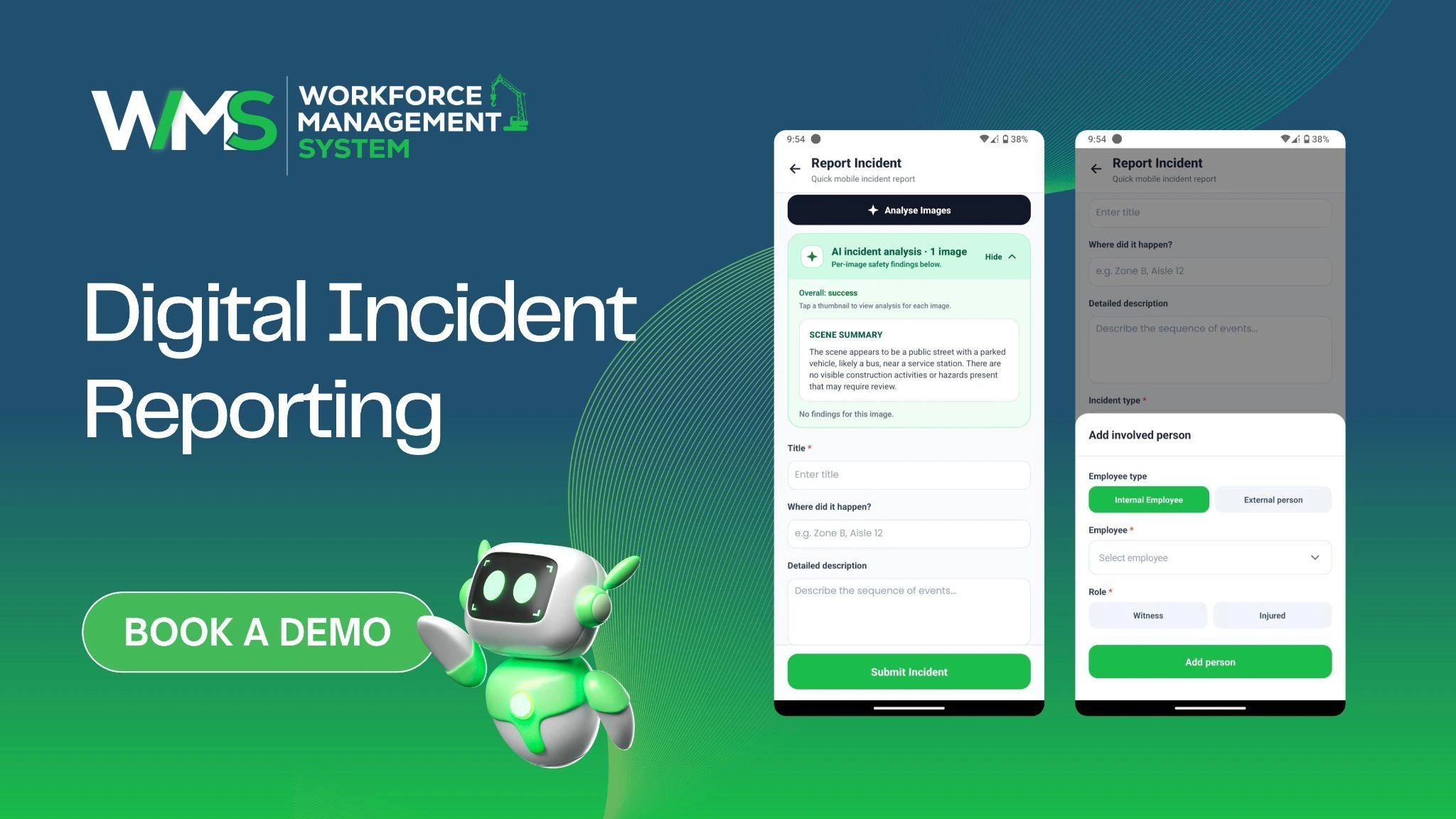
Records must be made of each incident. Digital reports allow guards to document what happened on their cell phone when it happens to prevent time gaps in documentation while including time and photos when appropriate and actions taken. They can be viewed immediately by the supervisor.
All are protected by good reports. They provide clear answers to clients, evidence of what happened to the insurer, and lessons learnt by the teams. Reports should be based on facts, and privacy is respected – information should not be shared with others unless necessary – in accordance with Australian privacy laws. The following table lists the elements of a good report.
| Report Detail | Why It Matters |
|---|---|
| Time and location | Matches the event with alarms and patrols |
| Type of event | Shows patterns over time |
| Action taken | Proves a fast, proper response |
| Follow-up needed | Stops issues from being forgotten |
Security Monitoring and Alarm Response Through WMS
A workforce management (WFMS) system combines guard rosters, licences, attendance, alerts and reports in one. Supervisors and control room staff view the same information rather than having to flip through various tools to keep up. A guard’s shift, location and qualifications will accompany the alarm information, making for a quick decision by the teams.
WorkforceMS started working in the construction business, where teams and guards are constantly shifting between active sites and having to keep track of the details is a daily affair. This background is ideal for security teams with multiple locations, who require up-to-date and accurate information 24/7. In particular, reliable records are useful when night shifts are performed, and the supervisor is not on-site.
Key points to remember:
- Maintain one record for rosters, licences and incident records.
- Immediately inform the appropriate individuals of any alarms.
- Compare guards with sites about location, ability and licence.
- Analyse reports regularly to enhance plans.
WMS for Faster Incident Coordination
There are lots of people involved in an incident who must work together in the control room, with guards, supervisors, clients and even police or emergency services if involved. A WMS helps by providing a centralised listing of the roster, contact information and incident updates to stop anyone from having to search for information.
A guard is deployed, and notes can be made as the situation evolves. Progress can be seen by the supervisors, and clients can be informed of what is happening. Once the event is over, a comprehensive history of the event is available for review, making handover and reporting much easier. Clear answers are given to clients, and teams can demonstrate that there was proper care taken through each step.
Clear Handovers
Incidents will frequently be ongoing from one shift to the next. Documenting the event, activity and follow-up actions enables the next team to get up and running immediately. As a rush-and-bustle conversation at the gate is not lost, the client observes calm and organised service at all stages.
Data-Driven Security Decisions
Data is a key enabler for moving from “we think” to “we know”. Reports will provide an overview of the number of alarms, response time, false alarms and busiest periods for each site. These figures are evidence of the effectiveness of the plans and an indication when plans are not effective. This information can be used by the leaders to tweak rosters, patrol routes and the number of guards.
They can also provide clients with actual costs to help facilitate discussions on the amount of coverage a site requires and can help conduct honest discussions. As time passes, the better the data, the safer the sites, and the more the clients will trust the sites. An honest report will also provide a provider’s confidence in its service.
Learning From Every Alarm
All alarms, including false ones, provide a lesson. Teams look back on what caused it, how long their response took and what they found out, to have an improved response. When a single sensor continues to fail, it can be repaired. If one time slot is always occupied, it can be fulfilled more effectively. If the results are shared with guards, they also will want to be involved in improving the service.
Conclusion
Security monitoring and alarm response are effective processes when risks are known, alarm response is rapid and clear, and the proper guard is dispatched promptly. In WorkforceMS, security teams can maintain their rosters, licences and reports all in one location. Book a demo today to experience how predictive planning can make all responses faster.
Optimise your operations with WMS
Streamline scheduling, compliance, and workforce management in one platform.
Frequently Asked Questions
Maps use past incidents, times and places to indicate where issues are most likely to occur. This will allow the manager to be more confident in their guard cover planning.
Control rooms monitor alarms/sensors and notify the appropriate individuals and despatch a guard. Clear steps and live information enable quick response from teams.
No, they don't just provide teams with a better starting point. Final decisions on site are made by the guards/supervisors.
Alerts notify the proper individuals within seconds with the location, time and alarm type. This will eliminate delays and ensure everyone is working from the same facts.
Good records indicate when the person was dispatched and what was done. They also aid teams in reflecting on events and enhance plans.
Yes, WorkforceMS will display who is 'on shift', their location and what licence they have. The best guard can then be sent from the control rooms in one step.
Related Articles
Explore more insights on workforce management, compliance, and operations.
NDIS Support Coordination with Digital Workforce Tools
Improve NDIS support coordination with digital workforce tools. Match workers to participants, plan flexible rosters and track availability in one place.

Muhammad Asim
26 Oct 2026

Construction and Civil Labour Hire Through Smart WMS
Simplify construction and civil labour hire with a smart WMS. Plan rosters, track worker tickets, and manage multi-site crews in one place with less admin.
Muhammad Asim
23 Oct 2026
Smart Construction Site Security with WMS
Strengthen construction site security with a smart WMS. Plan guard shifts, track licences, and monitor site attendance in one place with less daily admin.
Muhammad Asim
22 Oct 2026
Ready to secure your operations?
