Best Payroll & Timesheet Software for Australian Builders
The best payroll timesheet software in Australia for construction businesses combines GPS-verified site clock-ins, automatic Modern Award (MA000020) and EBA interpretation, and a direct payroll sync, not just generic time tracking.
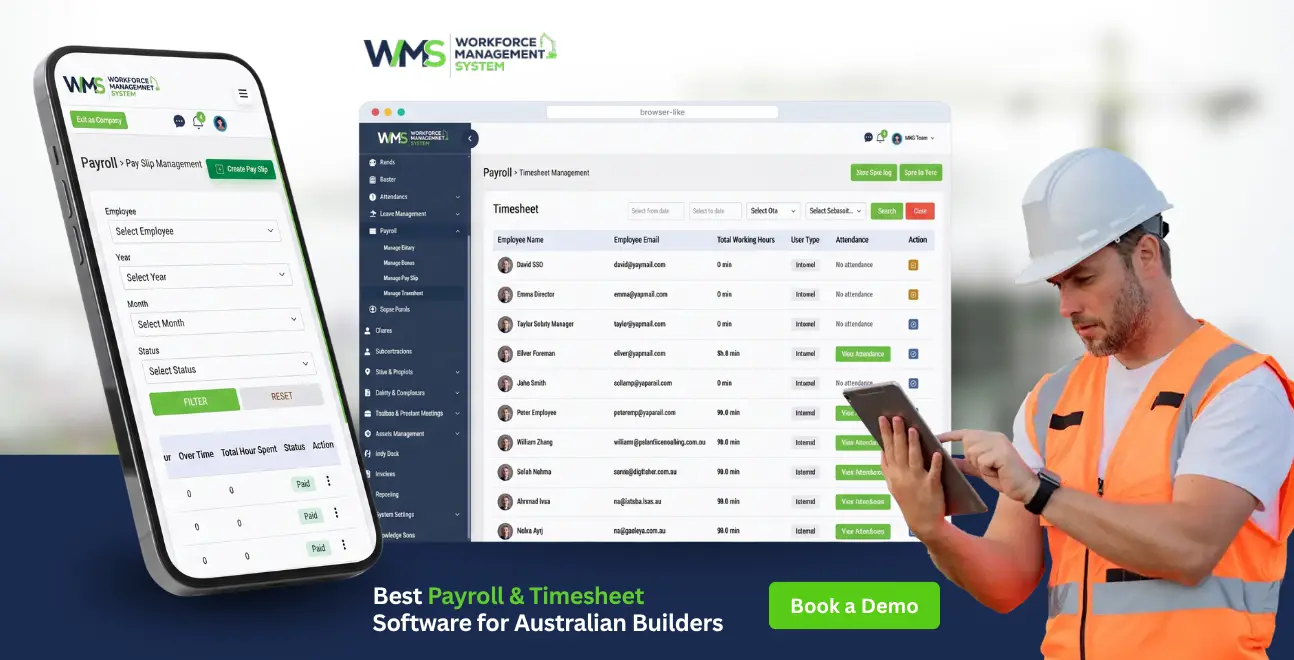
Streamline your frontline operations
The best payroll timesheet software in Australia for construction businesses combines GPS-verified site clock-ins, automatic Modern Award (MA000020) and EBA interpretation, and a direct payroll sync, not just generic time tracking. Look for:
- Multi-site GPS clocking: with offline mode for low-signal sites
- Built-in award and RDO calculations: MA000020 and EBA rules applied automatically
- One-click payroll sync: to Xero, MYOB, or your payroll system
- Audit-ready records: held for the Fair Work-required 7 years
- Mobile app crews will use: on-site, not just in the office
Introduction
Running payroll for a construction crew isn't like running payroll for an office. Workers move between sites, awards and EBAs overlap, and a single misclassified shift can turn into a six-figure back-pay problem. Paper timesheets and generic accounting tools weren't built for this, and Fair Work has named construction a priority audit sector, recovering hundreds of millions in industry-wide underpayments in the past year alone.
This guide compares the payroll timesheet software Australia construction businesses actually rely on, breaks down what MA000020 and EBA compliance really requires from your system, and shows where a purpose-built platform like WorkforceMS closes gaps that generic payroll tools leave open. No fluff, just the features, the comparisons, and the compliance detail you need before you buy.
Explore WorkforceMS's Core Modules
| Module | What It Handles |
|---|---|
| HRM | Employee records, onboarding, and compliance documentation in one place |
| Client | Client details, contacts, and job history linked to every project |
| Subcontractor | Subcontractor onboarding, compliance checks, and payment tracking |
| Sites & Projects | Site setup, crew assignment, and project-level cost tracking |
| Tender Management | Tender preparation, submissions, and win/loss tracking |
| Project Task Management | Task assignment, progress tracking, and deadlines by project |
| Safety & Compliance | Incident reporting, compliance checklists, and audit-ready records |
| Toolbox & Pre-start | Pre-start checklists and toolbox talks logged against each site |
| Asset Management | Equipment tracking, maintenance schedules, and site allocation |
| Invoices | Client invoicing linked directly to approved hours and project costs |
| Reporting | Cross-module reporting on labour cost, compliance, and project performance |
Why Generic Payroll Timesheet Software Fails on Construction Sites
Generic payroll tools assume a fixed workplace and a single pay rule. Construction crews work across multiple sites, under multiple awards or EBAs, with RDOs, site allowances, and shifting rosters, conditions most mainstream payroll Australia tools weren't designed to interpret automatically.
Standard accounting-first tools like plain Xero or MYOB can process a payslip, but they don't natively know that a carpenter hit CW5 classification this week, that Saturday work triggers a penalty rate, or that an RDO accrual needs adjusting. That gap gets filled manually, and manual is where underpayment risk lives.
What Is Construction Payroll Timesheet Software, Exactly?
It's software that captures where and when a worker clocked on (often by GPS or site kiosk), applies the correct Modern Award or EBA rate automatically, and pushes that data straight into a pay run without anyone re-typing hours.
At minimum, it should combine three functions in one data flow: time capture (mobile, kiosk, or biometric), award interpretation (MA000020, EBAs, RDOs, allowances), and payroll processing or integration (Xero, MYOB, or a native pay run). If any one of these is missing, you're back to manual reconciliation, and manual reconciliation is exactly what the Fair Work Ombudsman flags in audits.
Top Payroll Timesheet Software in Australia Compared
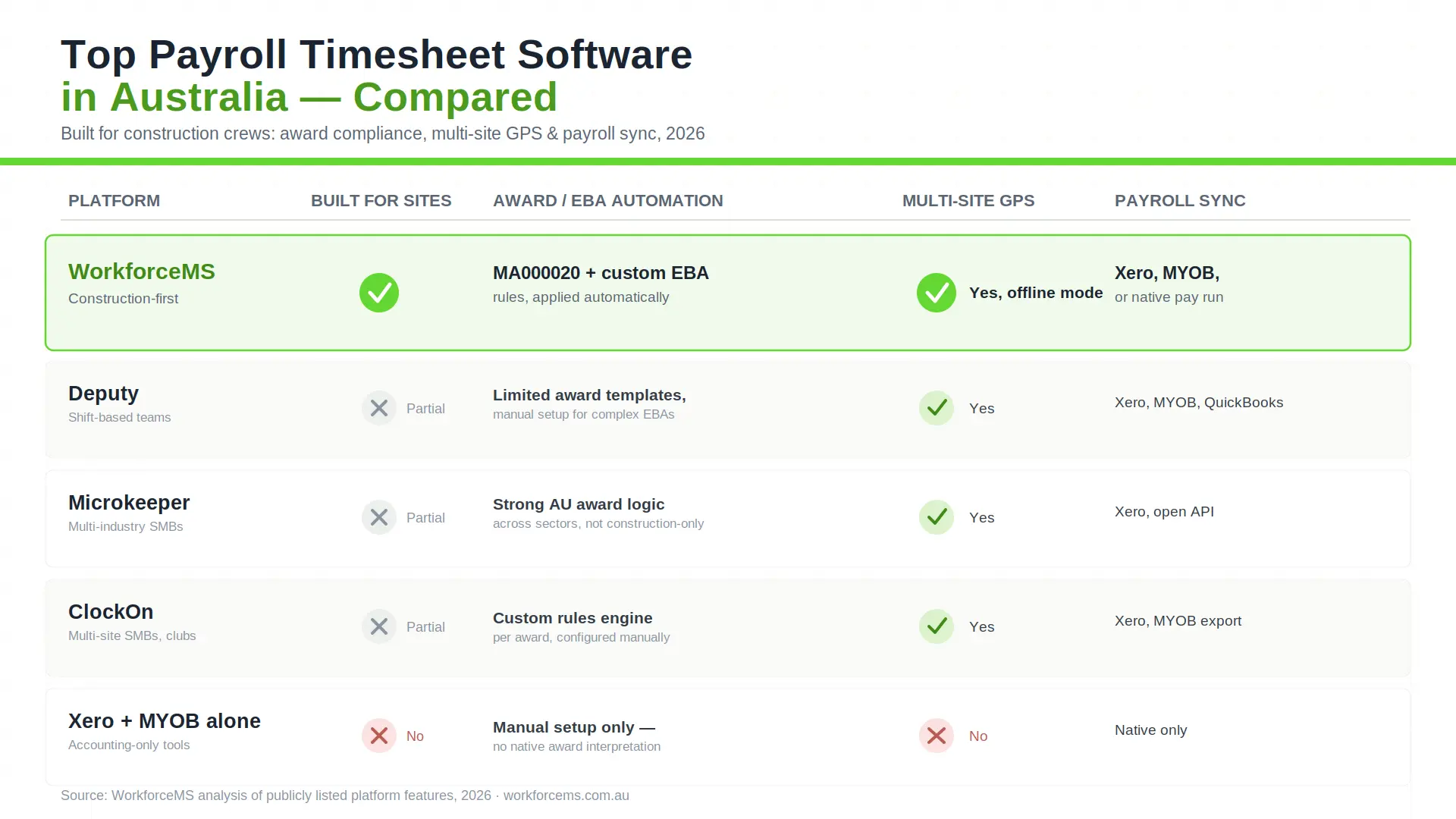
For construction specifically, the strongest options are WorkforceMS, Deputy, Microkeeper, and ClockOn. Each varies in how deeply it handles award interpretation versus rostering versus general time tracking.
| Platform | Built for construction? | Award/EBA automation | Multi-site GPS | Payroll sync | Best for |
|---|---|---|---|---|---|
| WorkforceMS | Yes | MA000020 + custom EBA rules | Yes, with offline mode | Xero, MYOB, direct pay run | Crews on multiple, low-signal sites |
| Deputy | Partial | Limited award templates | Yes | Xero, MYOB, QuickBooks | Shift-based teams generally |
| Microkeeper | Partial | Strong Australian award logic | Yes | Xero, API | SMBs across multiple industries |
| ClockOn | Partial | Custom ruleset engine | Yes | Xero, MYOB export | Clubs, multi-site SMBs |
| Xero / MYOB alone | No | Manual setup only | No | Native | Simple, single-site payroll only |
WorkforceMS
Purpose-built for construction crews: GPS and offline clock-in for sites with patchy signal, pre-configured MA000020 logic, and direct payroll sync so approved hours become a compliant payslip without re-entry.
Deputy
A widely used shift-work platform with solid rostering and reasonable time-tracking. Award handling is more generic than construction-specific systems, so complex EBA arrangements often need manual configuration.
Microkeeper
An Australian-built, all-in-one HR, rostering, and payroll platform with genuinely strong Modern Award logic across industries, including construction, though it isn't exclusively construction-focused.
ClockOn
Rostering, attendance, and payroll in one system with a configurable rules engine, a solid fit for multi-site SMBs, including construction and club-style shift environments.
Xero + MYOB (accounting-only)
Excellent for the accounting side of payroll, but neither natively interprets Modern Awards or EBAs. You'll need a timesheet layer (or a system like WorkforceMS) feeding accurate, pre-calculated hours into them.
How Award & EBA Interpretation Should Work (MA000020 Focus)
The system should read the timesheet's date, time, site, and worker classification, then automatically apply the correct MA000020 or EBA rate (ordinary hours, overtime, penalties, and allowances) without a payroll officer manually cross-referencing the award.
Construction crews commonly sit across the Building and Construction General On-site Award and CFMEU, ETU, or CEPU enterprise agreements simultaneously.
Getting this wrong isn't a rounding error: since January 2025, intentional underpayment is a criminal offence, with penalties up to $7.825 million for a company. Automated award interpretation is now closer to a compliance requirement than a convenience feature.
GPS Clock-In and Multi-Site Time Tracking
GPS or geofenced clock-in confirms a worker was physically on-site when they logged hours, closing the "buddy punching" gap paper timesheets and basic apps can't catch.
For crews working across several active jobs in a week, location-verified clocking also solves job-costing: hours attach to the correct site and cost code automatically, so labour-cost reporting per project stays accurate without a supervisor manually splitting timesheets after the fact.
From Timesheet to Payslip: Closing the Payroll Loop
Approved timesheets should flow directly into a pay run with no re-typing, the single biggest source of transcription error in construction payroll.
The American Payroll Association estimates manual timesheet entry carries a 1-8% error rate. Applied to a ten-person crew on an average loaded rate, that's roughly $1,000-$8,000 a month in payroll errors, almost always undetected until an audit or an employee complaint surfaces.
5 Construction Payroll Mistakes That Trigger Fair Work Penalties
Misclassifying workers under the wrong award level or CW rating.
Manually calculating RDOs, causing accrual drift over a project.
Missing site allowances tied to a specific job or location.
Not retaining records for 7 years, as the Fair Work Act requires.
Rekeying hours between systems, introducing transcription errors at the exact point auditors check first.
Features to Check Before You Buy

Prioritise Australian award/EBA logic, offline-capable mobile clocking, direct payroll integration, and exportable audit trails over general "nice to have" extras like chat or scheduling templates.
- Pre-built MA000020 and common EBA templates
- GPS/geofencing with offline queuing for low-signal sites
- STP-ready payroll export or native pay run
- Configurable RDO and allowance rules
- Seven-year, audit-ready record retention
What Compliant Payroll Looks Like for a 30-Person Crew
With an integrated system, payroll for a 30-person, multi-award construction crew typically takes under an hour per pay run once configured, down from roughly two full days of manual reconciliation.
Supervisors approve GPS-verified timesheets on-site; the system applies the correct award, EBA, and RDO rules automatically; and the pay run exports straight to Xero or MYOB, or processes natively with a full audit trail attached to every payslip.
The Real Cost of Manual Timesheets
Beyond the $1,000-$8,000/month error range for a 10-person crew, Fair Work recovered $358 million in underpayments across all industries in the past year, with construction remaining a named enforcement priority, making manual timesheets a compliance liability, not just an efficiency one.
Handling RDOs, Allowances, and Multi-Award Crews
The software needs configurable rules per classification, not a one-size-fits-all rate, because a single crew can span apprentices, tradespeople, and leading hands, each under different pay points within the same award or EBA.
Look specifically for systems that let you set custom rules for RDO accrual rates, site/travel allowances, and shift or weekend loadings, and that flag anomalies (like an employee approaching overtime thresholds) before the pay run, not after.
What's Changing in 2026 (Closing Loopholes, STP2)
The Closing Loopholes amendments are now fully in effect, criminal penalties for intentional underpayment apply from 2025, and STP Phase 2 reporting requirements mean payroll systems must report more granular income-type data than in previous years.
Construction businesses should treat award-interpretation software less as an optional upgrade and more as core compliance infrastructure heading into the next Fair Work audit cycle.
Is WorkforceMS Right for Your Site?
WorkforceMS fits construction businesses running crews across multiple sites under MA000020 or an EBA, where offline-capable GPS clocking, automatic award interpretation, and a direct payroll sync matter more than generic scheduling features. If your current setup still means someone manually cross-checking a paper timesheet against an award, that's the exact gap this platform is built to close.
Get Started With WorkforceMS
Bring GPS-verified time tracking, automated award compliance, and payroll sync into one system built for Australian construction crews. Start your WorkforceMS trial or log in to your existing timesheets login to see your next pay run calculated automatically.
Conclusion
Choosing the right payroll timesheet software Australia construction businesses can rely on comes down to one question: does it remove manual award interpretation and re-keyed data entry, or just digitise the paperwork?
Platforms like WorkforceMS, Deputy, Microkeeper, and ClockOn each solve part of that puzzle, but for multi-site crews under MA000020 or EBAs, the tools that automate award logic end-to-end are the ones that keep both payroll and Fair Work compliance genuinely under control.
Start your WorkforceMS trialOptimise your operations with WMS
Streamline scheduling, compliance, and workforce management in one platform.
Frequently Asked Questions
No, they handle the accounting side well but don't natively interpret Modern Awards or EBAs, so you'll still need a timesheet/award layer feeding accurate hours into them.
Some tools offer free tiers for small teams, but free plans rarely include Award interpretation, STP export, or multi-site GPS clocking features construction crews typically need.
Under the Fair Work Act 2009, employers must keep timesheet and pay records for at least seven years and produce them on request.
Some platforms support contractor time tracking separately, but Fair Work record-keeping obligations apply to employees, not independent contractors. Confirm classification with an advisor if unsure.
A serious contravention of MA000020 can attract penalties of up to $939,000 per breach for a company, and intentional underpayment has been a criminal offence since January 2025.
Not if your platform combines rostering, time capture, and payroll in one system. That's the main advantage of an integrated tool like WorkforceMS over stitching together separate apps.
WorkforceMS is built specifically around construction conditions, offline GPS clocking for low-signal sites and MA000020/EBA logic as a default, not an add-on configuration.
Yes. An employee login portal is standard in modern platforms, letting workers view rosters, submitted timesheets, and payslips directly.
Yes. GPS-tagged hours can attach automatically to the correct site and cost code, giving accurate labour-cost reporting per project without manual splitting.
Apps like the Payroller timesheet app focus on simple pay runs for small teams; a full platform adds award automation, multi-site GPS tracking, and rostering in the same system.
Related Articles
Explore more insights on workforce management, compliance, and operations.

Top AI Solutions To Manage Construction Workforce
Explore the top AI solutions for managing a construction workforce, from onboarding to payroll and safety, with human review built in.
WorkforceMS Team
14 Sep 2026

Streamline Job Tracking with AI Construction Management Software
Discover how AI construction management software streamlines job tracking, project planning, risk alerts, defect reporting and safety compliance.
WorkforceMS Team
11 Sep 2026

Skills and Compliance Management for Construction Teams
Manage skills and compliance for construction teams with WorkforceMS. Track licences, SWMS, inductions and audits in one workforce management system.
WorkforceMS Team
10 Sep 2026
Ready to secure your operations?
